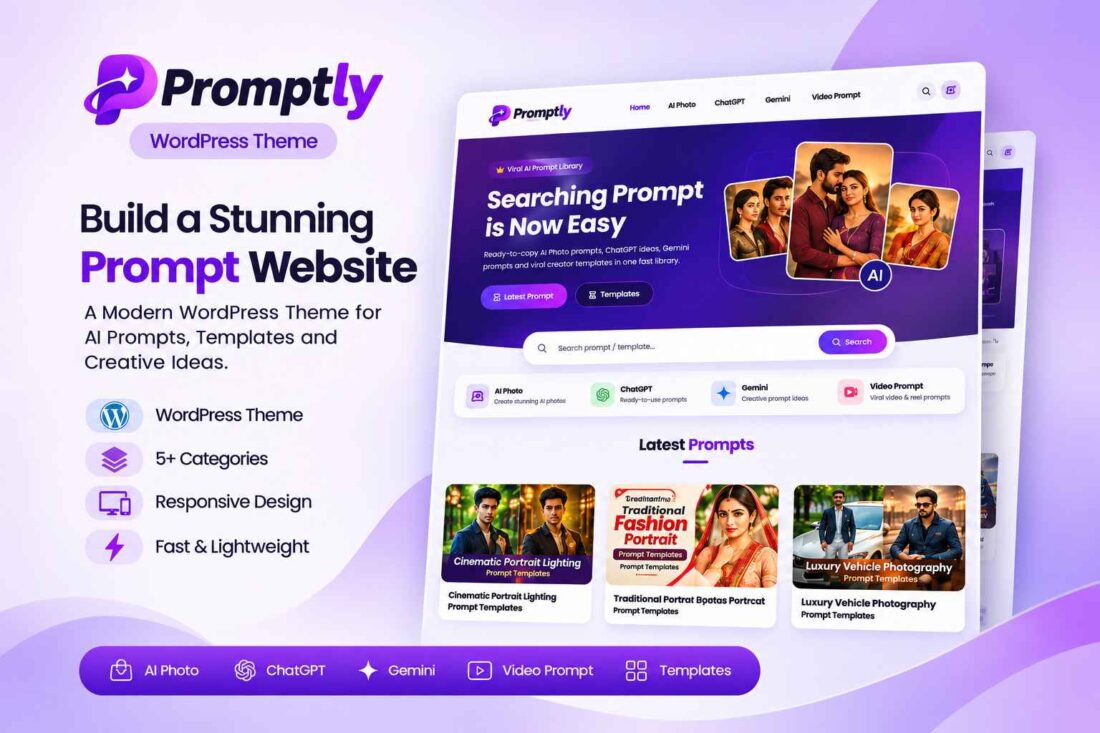
Promptly – AI Prompt Library WordPress Theme
- Build a professional AI prompt library website
- Display prompts with interactive copy buttons
- Add custom AI generation links
- Customize colors, homepage, and layouts
- Monetize using flexible advertising placements
- Export and import website content easily
- Lifetime Access
- 6 Months Support
- Commercial License
- Instant Download
- Regular Updates
- Well Documentation
Description
Build a Professional AI Prompt Library Website
Promptly is a modern WordPress theme designed for creating an engaging AI prompt library. Whether you publish AI photo editing prompts, ChatGPT ideas, Gemini prompts, video prompts, or creative templates, Promptly provides an organized platform to showcase your content and help visitors discover useful prompts.
Beautiful Homepage and Prompt Layouts
Create an attractive homepage with a gradient hero section, customizable heading, description, call-to-action buttons, and image collage. Display your latest posts in a clean grid and organize content through dedicated category sections. Visitors can explore your website using the built-in search functionality and responsive navigation.
Interactive Prompt Cards
Make your prompt articles more useful with the dedicated Prompt Cards system. Add multiple prompt cards to individual posts, each with its own image, title, and copyable prompt text. Include a Generate button that links to supported platforms or your own custom URL. Visitors can quickly copy prompts without manually selecting text.
Customization and Monetization
Manage your website appearance through the dedicated Promptly settings dashboard. Customize brand colors, homepage content, image ratios, author information, footer details, and social links. Built-in advertising placements let you add ad codes across the header, homepage, individual posts, between prompt cards, and footer. The theme also includes dark mode, bookmarks, sharing options, and reading progress.
Easy Content Management and Migration
Promptly uses the familiar WordPress post editor and includes a dedicated prompt-card editor. Its Export / Import feature helps transfer posts, prompt cards, categories, tags, theme settings, menus, and associated images between websites.
Designed for WordPress 5.8 or later and PHP 7.4 or later, Promptly is a practical foundation for building your own professional prompt-sharing website.
Key Features
- Modern homepage with customizable gradient hero section
- Dedicated prompt cards with one-click copy buttons
- Generate buttons with platform and custom URL support
- Dark mode and responsive mobile-friendly design
- Customizable brand colors, layouts, and image ratios
- Multiple advertising placements for monetization
- Built-in Export / Import for website content and settings
Installation Guide
- Download the Promptly theme ZIP file to your computer.
- Log in to your WordPress admin dashboard.
- Navigate to Appearance → Themes → Add New Theme → Upload Theme.
- Select the `promptly.zip` file and click Install Now.
- After installation is complete, click Activate to enable the Promptly theme.
- Navigate to Dashboard → Promptly to access the theme settings.
- Configure your brand colors, homepage hero text, buttons, images, post display settings, and other available options.
- Go to Appearance → Customize → Site Identity to upload your website logo.
- Navigate to Appearance → Menus and create your primary navigation menu and footer menus. Assign them to the appropriate theme locations.
- Create your prompt categories, such as AI Photo, ChatGPT, Gemini, Video Prompt, and Templates. Use the matching category slugs for the homepage category links.
- Create a new blog post and add its featured image, title, and introductory content.
- Find the Prompt Cards section in the post editor. Add prompt images, card titles, prompt text, and optional Generate buttons with platform or custom URLs.
- Publish your post and check that the prompt cards and copy buttons display correctly.
- Open Dashboard → Promptly → Advertisement to configure your advertising codes and placements.
- Use Dashboard → Promptly → Export / Import when you need to transfer supported website content and settings to another Promptly installation.
Related products
-
 View Details
৳ 3,603৳ 553 -
 View Details
৳ 3,603৳ 622 -
 View Details
৳ 3,603৳ 553 -
 View Details
৳ 3,603৳ 1,385

Reviews
There are no reviews yet.