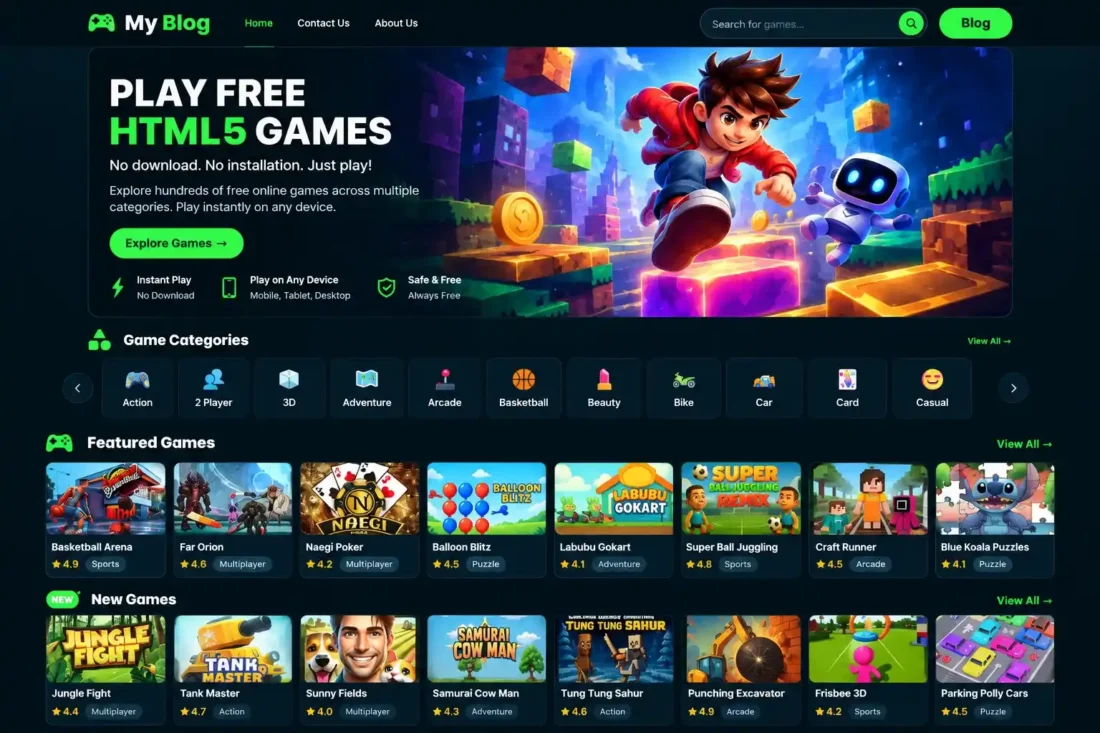
PlayHub WordPress Gaming Theme
- Modern WordPress theme for browser gaming websites
- Dark gaming design with neon-green accents
- Dedicated game library with categories and tags
- Game pages supporting URLs and iframe embeds
- Featured and popular games homepage sections
- Backup ZIP containing 437 games and media
- Lifetime Access
- 6 Months Support
- Commercial License
- Instant Download
- Regular Updates
- Well Documentation
Description
Build a Modern Gaming Website
Launch a professional browser gaming portal with PlayHub, a responsive WordPress theme designed for online game websites, gaming blogs, and HTML5 game collections. Its dark interface with neon-green accents creates an engaging gaming atmosphere, while structured layouts help visitors explore games across desktop, tablet, and mobile devices.
Dedicated Game Library
PlayHub includes a custom Games post type with individual game pages, searchable game listings, categories, and tags. Add game URLs or HTML iframe embed codes, display ratings, reviews, and play counts, and mark titles as Featured or Popular. Category icons and organized game archives make it easier for visitors to discover their favorite games.
Engaging Homepage and Blog
Highlight your collection with dedicated Featured Games and Popular Games sections, attractive game cards, and category navigation. The theme also supports standard WordPress posts, blog layouts, and paragraph-based advertising insertion. Customize the homepage hero content, promotional image, typography, social profile links, and footer settings to match your website’s branding.
Built-In Advertising and Backup Tools
Manage advertisements through the PlayHub dashboard and assign ad placements to supported website locations, including selected positions within blog content. The Game Backup feature lets you export your game library with metadata, categories, tags, and thumbnails or import a compatible backup ZIP. Existing game entries can be updated by matching their slugs.
Full Demo Backup Included
This bundle includes a separate backup ZIP containing 437 game entries and associated media files. Import the supplied demo content to populate your gaming website faster instead of adding every game manually. PlayHub is a practical starting point for gaming publishers, bloggers, and developers who want a customizable WordPress game portal with dedicated game management tools.
Key Features
- Modern dark gaming design with neon-green accents
- Custom game library with categories and tags
- Game pages supporting URLs and iframe embeds
- Featured Games and Popular Games homepage sections
- Ratings, reviews, play counts, and related games
- Advertisement management with blog paragraph insertion
- Backup ZIP containing 437 games and media files
Installation Guide
- Download both the PlayHub theme ZIP and the separate `playhub-backup.zip` file to your computer.
- Log in to your WordPress Dashboard and navigate to Appearance → Themes → Add New Theme → Upload Theme.
- Select the PlayHub theme ZIP file, click Install Now, and then click Activate.
- Navigate to Settings → Permalinks and click Save Changes to refresh WordPress URL rules.
- Open PlayHub → Game Backup from your WordPress Dashboard.
- Under the Import section, select the `playhub-backup.zip` file from your computer.
- Click Import Backup and wait for the import process to finish. Avoid closing the page while the import is running.
- Review the import results to check the number of games imported, skipped, or affected by errors.
- Open PlayHub → Games to review your imported game entries and edit their titles, descriptions, categories, thumbnails, or embed codes as needed.
- Navigate to PlayHub → Settings to customize the logo text and homepage hero content.
- Open Appearance → Customize to configure the homepage promotional image, typography, social links, and footer settings.
- Go to Appearance → Menus to create your navigation menus and assign them to the available menu locations.
- Open PlayHub → Advertisements to add advertising entries and configure their supported display positions.
- Visit the homepage, game archives, category pages, individual game pages, and blog to verify the layout and imported content.
- Test game embeds, search, navigation, advertisements, and mobile responsiveness before launching your website.
- Keep the theme ZIP and backup ZIP stored safely for future installations or content restoration.
Related products
-
 View Details
₹2,599.00₹399.00 -
 View Details
₹2,599.00₹1,499.00 -
 View Details
₹2,599.00₹499.00 -
 View Details
₹2,599.00₹449.00

Reviews
There are no reviews yet.