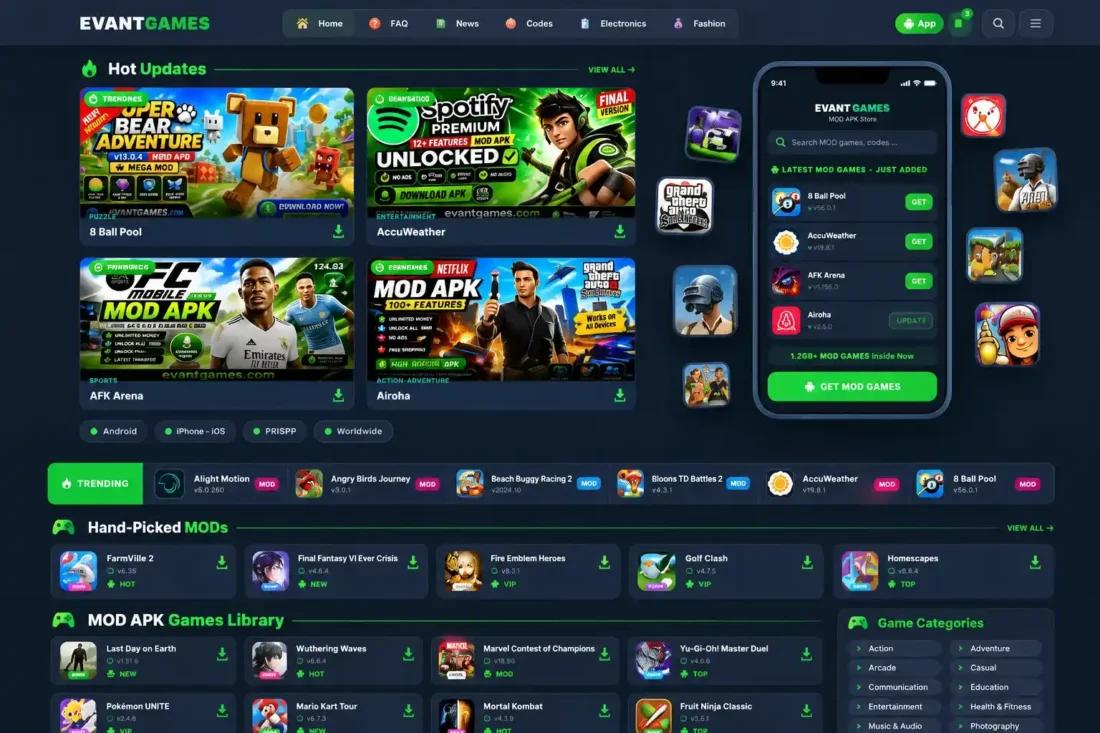
EvantGames WordPress Theme – Gaming Website
- Modern WordPress theme for gaming websites
- Dedicated game library with genre archives
- Detailed game pages with download information
- Featured sections for trending games
- Responsive design with mobile-friendly navigation
- Full backup with game data and media
- Lifetime Access
- 6 Months Support
- Commercial License
- Instant Download
- Regular Updates
- Well Documentation
Description
Build a Modern Gaming Website
Create a dedicated gaming website with the EvantGames WordPress Theme and Full Backup Bundle. Designed for gaming blogs, Android game libraries, MOD game websites, and download portals, EvantGames provides a modern interface for showcasing games, publishing gaming articles, and helping visitors discover popular titles.
Game Library and Discovery
Organize your gaming content with dedicated game entries, genre archives, search functionality, and individual game detail pages. The theme supports game information such as app version, Android version, developer, and total downloads. Featured game placements help you highlight trending titles and bring important updates to the attention of visitors.
Responsive Design and Navigation
EvantGames includes responsive layouts for desktop and mobile visitors, a mobile slide-out navigation menu, a search overlay, and saved games functionality. Customizable theme colors, a custom logo, navigation menus, and footer settings help you adapt the website to your brand.
Download Pages and Content Management
Use dedicated game download pages alongside standard WordPress posts, pages, archives, and search results. The theme also includes FAQ page support, game placement management, and Progressive Web App (PWA) functionality. These tools help you build a more complete gaming portal without assembling every section from scratch.
Full Backup Bundle Included
The accompanying backup ZIP contains game data and media files for restoring supported demo content. It includes games.json and a media folder. Import the backup through WordPress Admin → Games → Import / Export to bring in the included content and associated placements.
EvantGames is a practical starting point for developers, gaming bloggers, and digital publishers who want a customizable WordPress gaming website with dedicated game management and ready-to-import demo content.
Key Features
- Modern WordPress theme for gaming websites and portals
- Dedicated game library with genre-based archives
- Individual game pages with detailed app information
- Featured placements for trending games and updates
- Responsive mobile navigation with search overlay
- Saved games, FAQ pages, and PWA functionality
- Full backup bundle with game data and media files
Installation Guide
- Download the EvantGames theme ZIP file and the separate EvantGames backup ZIP file to your computer.
- Log in to your WordPress Dashboard and navigate to Appearance → Themes → Add New Theme → Upload Theme.
- Select the EvantGames theme ZIP file, click Install Now, and then click Activate.
- Navigate to Settings → Permalinks, choose a permalink structure other than Plain, and click Save Changes to refresh WordPress URLs.
- Open Appearance → Customize to configure your site logo, theme colors, navigation, footer, and other available appearance settings.
- Go to Appearance → Menus, create or edit your navigation menu, and assign it to the appropriate menu location.
- Navigate to Games → Import / Export in your WordPress Dashboard.
- Use the import option to upload the separate EvantGames backup ZIP file and import its included game data, categories, placements, and media according to the importer options.
- Wait for the import process to finish before leaving the page. For large backups, ensure your hosting upload and PHP execution limits are sufficient.
- Open the imported game entries and check their titles, categories, featured images, metadata, and download information.
- Visit your homepage, game library, individual game pages, genre archives, search, FAQ, and download pages to verify that everything displays correctly.
- If the imported content references media URLs from the original website, migrate the corresponding media files or update those URLs to match your new website.
- Test the website on desktop and mobile devices before publishing it to visitors.
Related products
-
 View Details
₹2,599.00₹999.00 -
 View Details
₹2,599.00₹399.00 -
 View Details
₹2,599.00₹499.00 -
 View Details
₹2,599.00₹449.00

Reviews
There are no reviews yet.