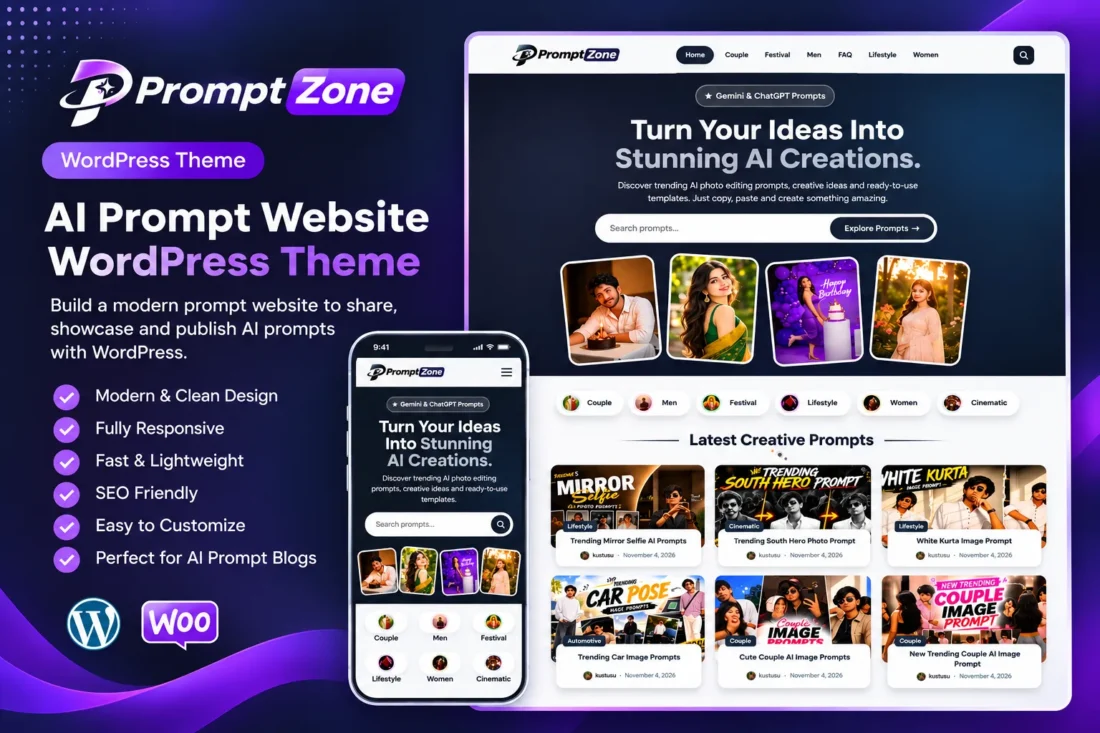
Prompt Zone – AI Prompt Library WordPress Theme
- Build a professional AI prompt library website
- Display prompts with one-click copy buttons
- Add ChatGPT and Gemini action buttons
- Customize homepage, colors, and layouts
- Monetize with flexible advertising placements
- Lightweight and responsive WordPress theme
- Lifetime Access
- 6 Months Support
- Commercial License
- Instant Download
- Regular Updates
- Well Documentation
Description
Build a Professional AI Prompt Website
Prompt Zone is a clean, lightweight Classic WordPress theme designed for AI prompt libraries, photo-editing prompt blogs, and creative inspiration websites. Whether you publish AI portrait prompts, couple photography ideas, creative concepts, or ready-to-use templates, Prompt Zone helps you organize and showcase your content in an attractive, user-friendly layout.
Modern Homepage and Content Discovery
Create an engaging homepage with a customizable hero section, headline, description, live search, and four-image collage. Display your content using a responsive prompt grid, category pills, and a trending prompts section based on post views. Adjust the number of posts and grid columns to suit desktop, tablet, and mobile screens.
Interactive Copy-Prompt System
Make your articles more useful with dedicated prompt boxes and one-click copy functionality. Use the [prompt_box] shortcode to display prompts in a stylish dark box. Additional shortcodes let you add step-by-step instructions with [how_to_use], helpful suggestions with [prompt_tips], and Create in ChatGPT or Create in Gemini buttons with [ai_buttons].
Customization and Monetization
Manage your website through the dedicated Prompt Zone dashboard. Customize brand colors, homepage content, hero images, category selection, footer information, social links, and card layouts. Built-in advertising placements support AdSense and other custom ad codes across the header, homepage, content grid, individual posts, and footer. The theme also includes an author box, related posts, and a floating WhatsApp button.
Lightweight and Responsive WordPress Theme
Prompt Zone supports custom logos, navigation menus, featured images, widgets, and a full-width page template. Self-hosted DM Sans fonts help avoid external Google Fonts requests. It requires WordPress 5.8 or later and PHP 7.4 or later, making it a practical foundation for launching your own AI prompt website.
Key Features
- Modern homepage with hero section and four-image collage
- Responsive prompt grid with adjustable column settings
- One-click copy-to-clipboard prompt boxes
- Dedicated shortcodes for instructions, tips, and AI buttons
- ChatGPT and Gemini integration buttons
- Customizable colors, categories, and homepage sections
- Multiple advertising placements and floating WhatsApp button
Installation Guide
- Download the Prompt Zone theme ZIP file to your computer.
- Log in to your WordPress admin dashboard.
- Navigate to Appearance → Themes → Add New Theme → Upload Theme.
- Select the `promptzone.zip` file and click Install Now.
- After installation is complete, click Activate to enable the Prompt Zone theme.
- Go to Settings → Reading and configure your homepage display preference. The theme's front-page template displays the custom homepage with either the latest posts or a static page selected.
- To create a separate blog page, create a new page and assign it as the Posts page under Settings → Reading.
- Navigate to Appearance → Menus and create your primary navigation menu. Assign it to the Primary Menu location.
- Optionally create and assign menus to the Footer: Explore and Footer: Useful Links locations.
- Open the Prompt Zone menu in your WordPress dashboard to configure the hero text, hero images, category pills, trending prompts, card grid columns, brand colors, social links, and footer settings.
- Create your prompt categories under Posts → Categories and publish articles using the standard WordPress post editor.
- Set a Featured Image for each post to display it in the homepage collage and prompt grids.
- Use the `[prompt_box]`, `[how_to_use]`, `[prompt_tips]`, and `[ai_buttons]` shortcodes to add interactive prompt content and helpful instructions.
- Open Prompt Zone → Advertisements to configure your advertising codes and available placements.
- Preview your website on desktop, tablet, and mobile devices to verify the design and functionality.
Related products
-
 View Details
$29.53$11.35 -
 View Details
$29.53$5.10 -
 View Details
$29.53$11.35 -
 View Details
$29.53$17.03

Reviews
There are no reviews yet.