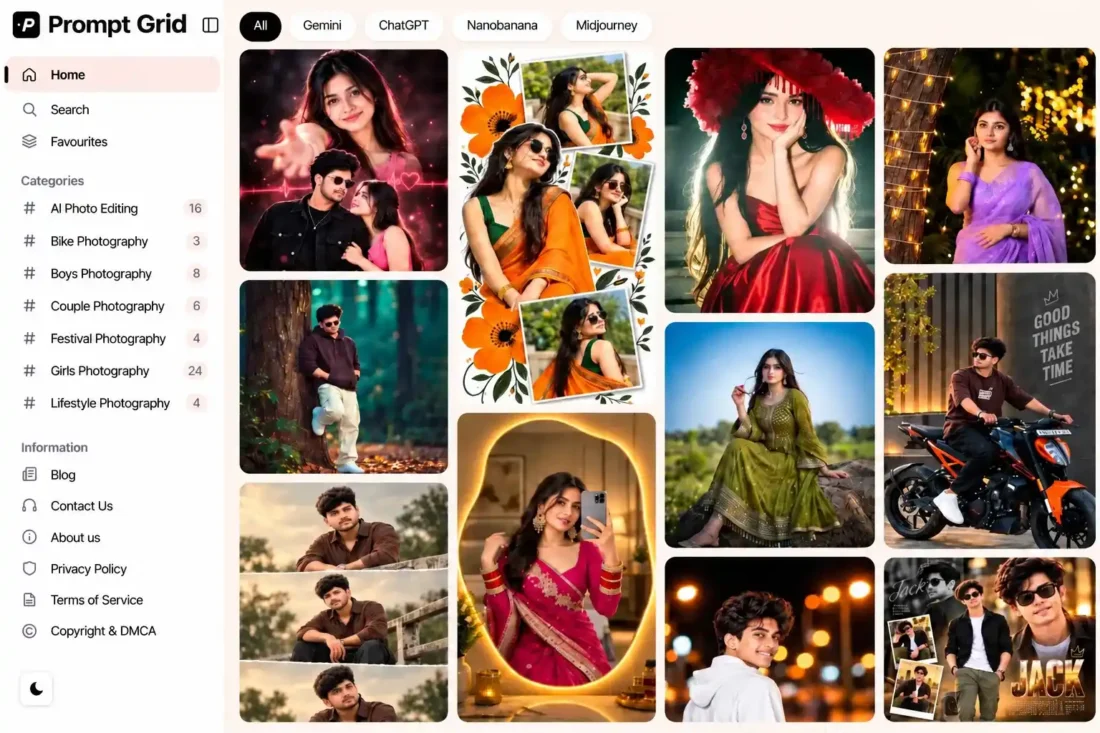
PromptGrid WordPress Theme – AI Prompt Gallery & Directory
- Modern WordPress theme for AI prompt websites
- Masonry grid with dedicated prompt pages
- Copy, like, and save prompt functionality
- Categories, AI models, tags, and search
- Bulk CSV import with ZIP image support
- Built-in advertising slots and customization options
- Lifetime Access
- 6 Months Support
- Commercial License
- Instant Download
- Regular Updates
- Well Documentation
Description
Build a Modern AI Prompt Website
Create a professional AI prompt directory with PromptGrid, a WordPress theme designed for prompt libraries, AI image prompt websites, and creative inspiration platforms. Its masonry-style prompt grid, clean interface, and dedicated prompt pages help visitors discover, explore, and reuse prompts with ease.
Dedicated Prompt Management
PromptGrid includes a custom Prompts post type with dedicated Prompt Categories, AI Models, and WordPress tags. Publish each prompt with a title, prompt text, featured image, author, and excerpt. Visitors can explore prompts through category archives, AI model filters, search, and individual prompt pages.
Interactive Prompt Features
Make your prompt library more useful with built-in Copy Prompt, Like, and Save Prompt actions. Visitors can save favourites in their browser and revisit them on the dedicated Favourites page. Individual prompt pages also display related prompts and interaction counts, helping users discover more content.
Customization and Monetization
Manage theme settings through the PromptGrid dashboard, including prompt display counts and supported advertising placements. Add advertising code to the available site-wide, prompt-page, and in-feed ad positions. Customize your website logo size separately for desktop and mobile through the WordPress Customizer.
Bulk Import and Easy Setup
Save time when adding large prompt collections with the built-in CSV importer. Import prompt titles, text, categories, AI models, tags, image references, publication status, dates, and interaction counts using supported columns. The importer also supports ZIP uploads containing a CSV and image files, making bulk content setup more convenient.
PromptGrid is a practical choice for creators and publishers building AI prompt libraries for tools such as ChatGPT, Gemini, and Midjourney. Its dedicated content system and interactive browsing features provide a strong foundation for a searchable prompt website.
Key Features
- Modern masonry grid for AI prompt collections
- Dedicated Prompts post type with categories and AI models
- One-click prompt copying with like and save actions
- Browser-based favourites with a dedicated Favourites page
- Related prompts, search, and load-more functionality
- Bulk CSV and ZIP import with image support
- Customizable advertising placements and logo sizing
Installation Guide
- Download the PromptGrid theme ZIP file to your computer.
- Log in to your WordPress Dashboard and navigate to Appearance → Themes → Add New Theme → Upload Theme.
- Select the `promptgrid.zip` file, click Install Now, and then click Activate.
- Navigate to Settings → Permalinks, choose a structure such as Post name, and click Save Changes to refresh WordPress URLs.
- Open PromptGrid in your WordPress Dashboard to access Theme Options and review the available settings.
- Go to Appearance → Customize → Site Identity to upload your logo and adjust the desktop and mobile logo widths.
- Navigate to PromptGrid → Theme Options → Tools to access the bulk prompt import feature.
- Prepare a CSV file with a `prompt` column. You can also include columns for title, category, AI model, tags, image, status, date, likes, copies, and saves.
- To import images with your prompts, prepare a ZIP file containing the CSV and the associated image files in the supported structure.
- Upload your CSV or ZIP file through the import interface and follow the on-screen instructions to process the prompts in batches.
- Review the imported prompts under Prompts → All Prompts and check their titles, content, categories, AI models, and featured images.
- Open Appearance → Menus to review the Information menu and adjust its links to match your website.
- Visit the homepage, prompt archive, category pages, AI model archives, individual prompt pages, and Favourites page to verify the layout and functionality.
- Open PromptGrid → Theme Options to configure the prompt display count and advertising placements, adding your own ad code where required.
- Test prompt copying, liking, saving, search, load more, and mobile responsiveness before launching your website.
Related products
-
 View Details
৳ 3,603৳ 622 -
 View Details
৳ 3,603৳ 1,385 -
 View Details
৳ 3,603৳ 622 -
 View Details
৳ 3,603৳ 692

Reviews
There are no reviews yet.