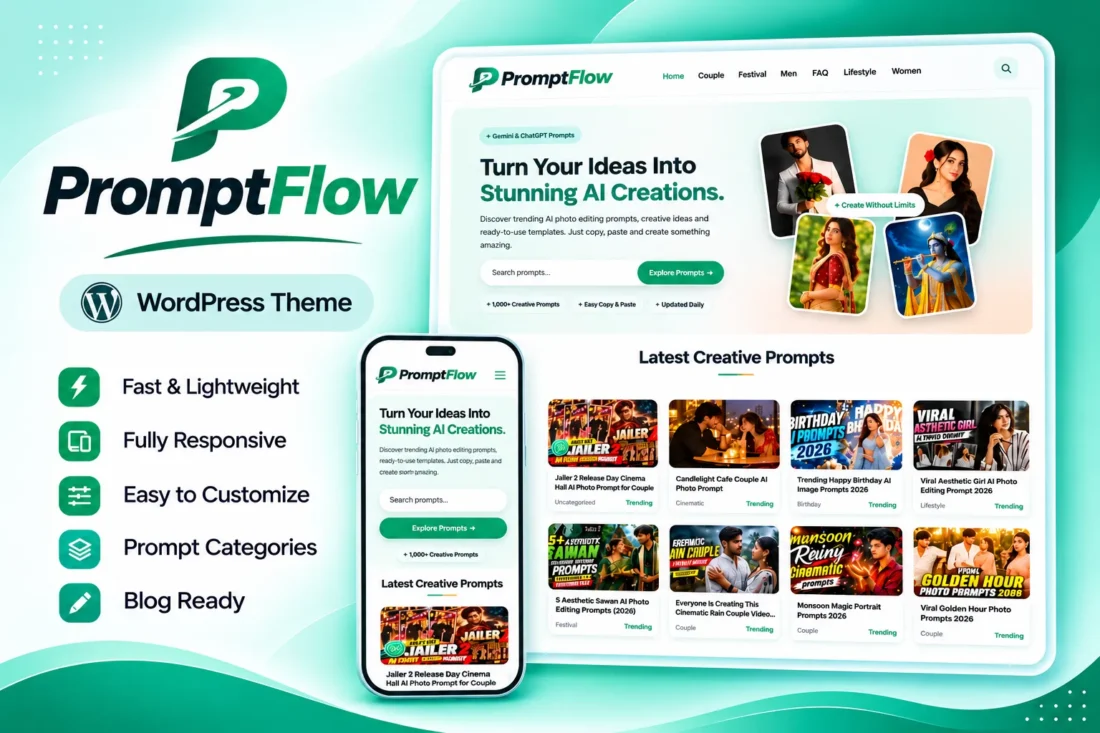
PromptFlow – AI Prompt Library WordPress Theme
- Build a modern AI prompt library website
- Showcase trending and latest creative prompts
- Add one-click copy prompt functionality
- Include ChatGPT and Gemini action buttons
- Customize homepage, colors, and layouts
- Monetize with flexible advertising placements
- Lifetime Access
- 6 Months Support
- Commercial License
- Instant Download
- Regular Updates
- Well Documentation
Description
Build a Modern AI Prompt Website
PromptFlow is a modern Classic WordPress theme designed for AI prompt libraries, creative prompt blogs, and AI photo editing websites. Whether you publish portrait prompts, photography ideas, creative templates, or AI-generated image inspiration, PromptFlow gives you an attractive platform to organize and showcase your content.
Engaging Homepage and Prompt Discovery
Create an impressive homepage with a customizable hero section, headline, description, search functionality, and four-photo collage. Showcase your content through a trending prompt grid, latest prompts list, and category section. You can control the number of displayed posts and adjust card columns for desktop, tablet, and mobile screens.
Interactive Copy-Prompt System
Make prompts easy to use with dedicated prompt boxes featuring one-click copy buttons. The theme also includes useful shortcodes for displaying step-by-step instructions, prompt tips, and Create in ChatGPT or Create in Gemini buttons. The WordPress block editor also supports a dedicated Prompt Box style for convenient content creation.
Customization and Monetization
Manage your website through the dedicated PromptFlow settings dashboard. Customize brand colors, homepage content, hero images, CTA banner, footer details, social links, and WhatsApp button. Monetize your website with configurable advertising placements below the header, homepage hero, inside content grids, within posts, and above the footer. You can also display author information and related posts.
Lightweight WordPress Theme
PromptFlow uses self-hosted DM Sans fonts, helping avoid external Google Fonts requests. It includes responsive navigation, a blog layout, featured images, widget support, and a full-width page template. Built for WordPress 5.8 or later and PHP 7.4 or later, it offers a practical foundation for launching your own AI prompt website.
Key Features
- Modern homepage with hero section and four-photo collage
- Trending prompts, latest posts, and category sections
- One-click copy buttons with dedicated Prompt Box shortcode
- ChatGPT and Gemini action buttons
- Responsive card grids with adjustable columns
- Customizable colors, CTA banner, and homepage settings
- Multiple advertising placements and WhatsApp button
Installation Guide
- Download the PromptFlow theme ZIP file to your computer.
- Log in to your WordPress admin dashboard.
- Navigate to Appearance → Themes → Add New Theme → Upload Theme.
- Select the `promptflow.zip` file and click Install Now.
- After installation is complete, click Activate to enable the PromptFlow theme.
- Go to Settings → Reading and configure your homepage display preference. The theme's front-page template renders the homepage with either latest posts or a static page selected.
- To create a separate blog page, create a new page and assign it as the Posts page under Settings → Reading.
- Navigate to Appearance → Menus and create your primary navigation menu. Assign it to the Primary Menu location.
- Optionally create and assign menus to the Footer: Explore, Footer: Company, and Footer: Legal locations.
- Open the PromptFlow menu in your WordPress dashboard to configure the hero text, hero photos, trending category, latest prompts, CTA banner, card grid columns, colors, social links, and WhatsApp button.
- Create your prompt categories and publish articles using the standard WordPress post editor.
- Set a Featured Image for each post to display it in the homepage collage and prompt grids.
- Use the `[prompt_box]`, `[how_to_use]`, `[prompt_tips]`, and `[ai_buttons]` shortcodes to add interactive prompt content and helpful instructions to your posts.
- Open PromptFlow → Advertisements to configure your ad codes and available advertising placements.
- Preview your website on desktop, tablet, and mobile devices to verify the layout and functionality.
Related products
-
 View Details
$29.53$11.35 -
 View Details
$29.53$11.35 -
 View Details
$29.53$4.53 -
 View Details
$11.35$2.83

Reviews
There are no reviews yet.