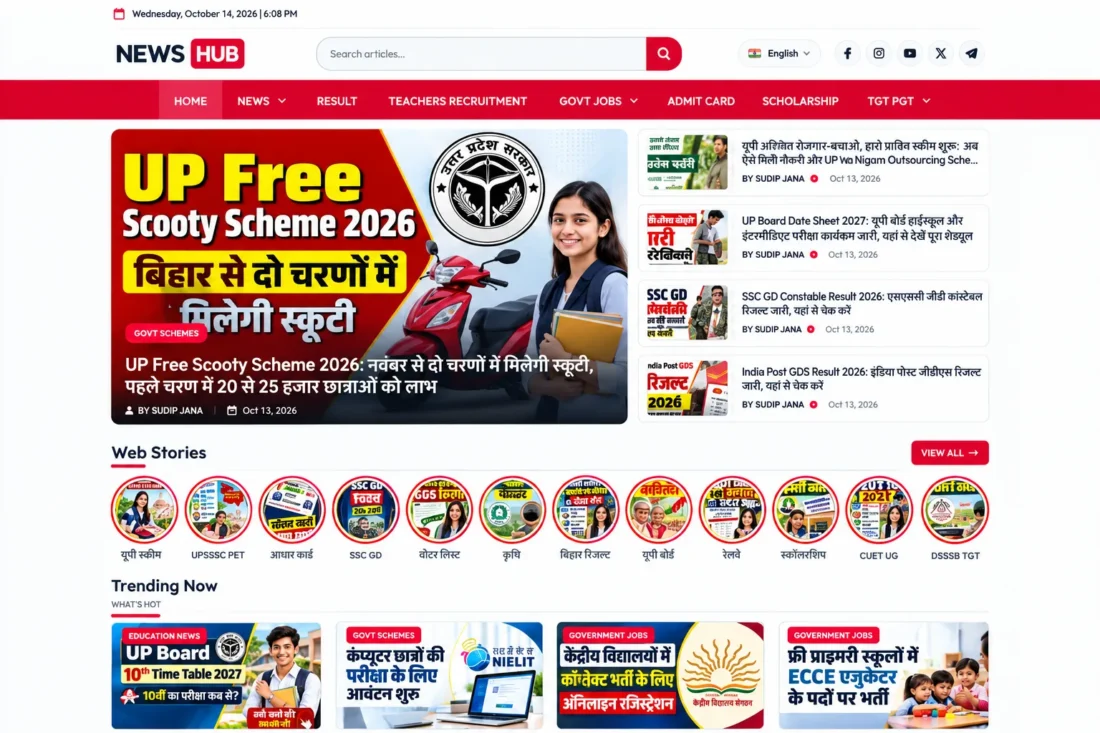
News Hub WordPress Theme – News, Jobs & Magazine Website
- Modern WordPress theme for news websites
- Customizable homepage with trending stories
- Dedicated Web Stories archive and pages
- Flexible category sections and post layouts
- Article pages with author details and sharing
- Customizable colors, typography, and logo
- Lifetime Access
- 6 Months Support
- Commercial License
- Instant Download
- Regular Updates
- Well Documentation
Description
Build a Modern News Website
Create a professional online publication with News Hub, a responsive WordPress theme designed for news portals, government job websites, education blogs, scholarship updates, exam notifications, and digital magazines. Its clean editorial layout helps readers discover recent articles, explore categories, and navigate important updates across desktop, tablet, and mobile devices.
Dynamic Homepage and Category Sections
Organize your homepage with a featured hero area, trending content, Web Stories placements, and customizable category-based post sections. Choose section layouts, adjust the number of displayed posts, enable or disable sections, and reorder them to suit your publishing priorities. The category grids help visitors explore related stories quickly.
Dedicated Web Stories and Article Pages
News Hub includes a custom Web Stories post type with a dedicated archive and individual story pages. Standard article pages support featured images, author information, reading-time estimates, social-sharing buttons, related articles, comments, breadcrumbs, and structured post details to create a more complete reading experience.
Customization and Publishing Tools
Personalize your website using the theme’s administration settings and WordPress Customizer. Configure logo sizing, typography, colors, homepage sections, archive layouts, single-post options, author information, and footer content. Widget areas provide additional flexibility for sidebars and other supported content placements.
Ideal for News and Educational Publishers
Whether you publish recruitment announcements, examination results, scholarship news, government schemes, or general current affairs, News Hub provides a flexible foundation for an organized content website. Use familiar WordPress posts and categories for articles, and manage Web Stories separately through the dedicated dashboard menu.
Key Features
- Modern responsive design for news and magazine websites
- Customizable homepage sections with drag-and-drop ordering
- Featured hero area with trending article placements
- Dedicated Web Stories post type and archive
- Category-based post grids with flexible layouts
- Single-post pages with author details and related articles
- Customizable typography, logo sizing, colors, and footer
Installation Guide
- Download the News Hub theme ZIP file to your computer.
- Log in to your WordPress Dashboard and navigate to Appearance → Themes → Add New Theme → Upload Theme.
- Select the `News-Hub.zip` file, click Install Now, and then click Activate.
- Navigate to Settings → Permalinks, choose a structure such as Post name, and click Save Changes to refresh WordPress URLs.
- Go to Appearance → Customize to configure your site logo, logo size, typography, colors, and other available design settings.
- Open the News Hub settings in your WordPress Dashboard to review the available theme options and configure author information, footer content, and other supported settings.
- Navigate to the News Hub homepage settings to enable or disable homepage sections, select post categories, choose layouts, adjust post counts, and reorder sections as needed.
- Open Appearance → Menus to create your primary navigation menu and assign it to the appropriate menu location.
- Go to Posts → Categories and create categories for your news topics, such as Government Jobs, Education, Scholarships, Results, and Current Affairs.
- Navigate to Posts → Add New Post to publish an article. Add the title, article content, featured image, category, and author details before publishing.
- Open Web Stories → Add New to create a Web Story. Add the story slides and their images using the available story editor, then publish the story.
- Visit the homepage, category archives, individual posts, Web Stories archive, and individual stories to verify that the content displays correctly.
- Test the navigation menu, social-sharing links, comments, sidebar widgets, and responsive layout on desktop and mobile devices before launching your website.
Related products
-
 View Details
$29.53$4.53 -
 View Details
$29.53$5.10 -
 View Details
$29.53$11.35 -
 View Details
$29.53$5.10

Reviews
There are no reviews yet.