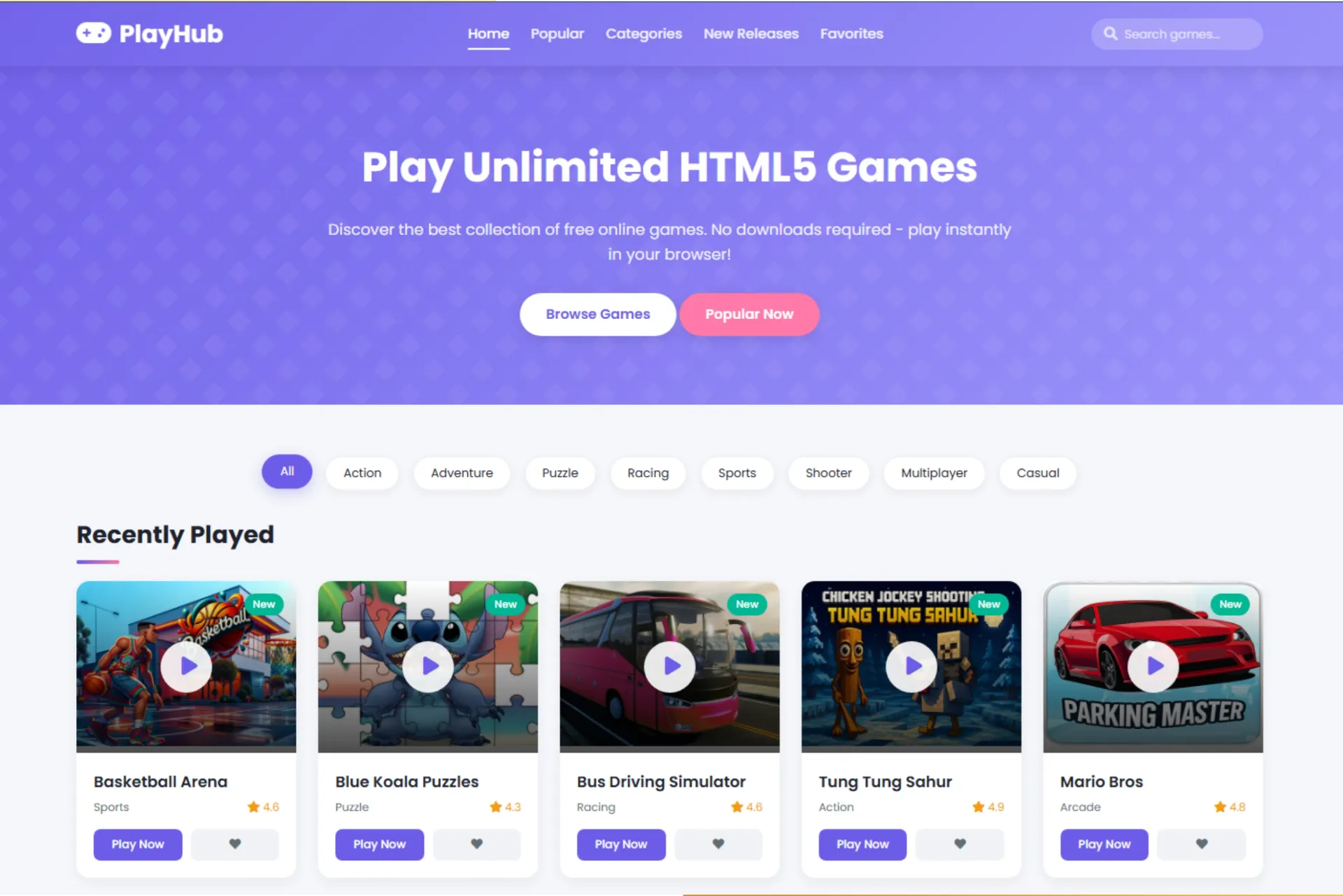
PlayHub – HTML5 Script
- 50+ premium HTML5 games – completely free with no ads
- Stunning gradient hero section with call-to-action buttons
- Elegant category filters + powerful instant search
- Recently played & favorites system (saved locally forever)
- Mobile slide-out menu with smooth overlay transitions
- Fullscreen game viewer with responsive iframe scaling
- Newsletter subscription with instant success/error messages
- Beautiful “New” badges on fresh releases
- Luxurious footer with social icons and quick links
- Single HTML file – save offline or host anywhere instantly
- Lifetime Access
- 6 Months Support
- Commercial License
- Instant Download
- Regular Updates
- Well Documentation
Description
PlayHub – Modern Online Gaming Website Template
Bring your online gaming project to life with PlayHub, a modern gaming website template package designed to help you organize and showcase a diverse collection of browser-game titles. With a structured image library, genre-based categories, and ready-made website files, PlayHub gives you a practical starting point for building a gaming directory or creating your own customized gaming website.
Discover Games Across Multiple Genres
PlayHub includes game thumbnail collections organized into categories such as Action, Shooting, Adventure, Casual, Racing, Puzzle, Arcade, Sports, and Multiplayer. This organization makes it easier to manage your game collection and arrange titles by genre, giving visitors a clearer way to explore your content.
Organized Images and Preview Files
The package includes numerous JPG game images stored in separate category folders, helping you keep your visual assets organized as your project grows. It also contains desktop and mobile preview images so you can review the template’s presentation before integrating it into your website.
Customize Your Gaming Website
Use the included index.html file as a starting point for adapting the website to your brand. You can update game titles, images, category content, colors, and links to suit your project. The package also includes About, Contact, Privacy, and Terms page files to help you prepare supporting website pages.
A Practical Starting Point for Your Project
PlayHub is suitable for developers, gaming website owners, and digital creators who want an organized foundation for a gaming-themed website. Extract the files, review the existing structure, and customize the content to match your requirements.
Important: This package contains website files and game images. Playable game files, game-hosting functionality, and a complete backend are not confirmed as included. You may need to connect game URLs or integrate playable games separately.
Key Features
- ## Key Features
- - Modern gaming website template package with an `index.html` file
- - Game image library organized into nine genre-based folders
- - Categories include Action, Shooting, Adventure, Casual, Racing, Puzzle, Arcade, Sports, and Multiplayer
- - Multiple JPG game thumbnails for showcasing game collections
- - Desktop and mobile preview images included
- - Supporting About, Contact, Privacy, and Terms page files
- - Customizable foundation for gaming directories and game showcase websites
Installation Guide
- ## Installation Guide
- Extract the downloaded PlayHub ZIP file on your computer.
- Open `index.html` in a web browser to inspect the available website layout and content.
- Review the `image` folder and its category subfolders to understand how game thumbnails are organized.
- Upload `index.html`, the complete `image` folder, preview files if needed, and the supporting page files to your web hosting directory.
- Keep the original folder structure and image paths intact to help prevent broken images.
- Edit the HTML content, game titles, images, category details, and links to match your website and branding.
- Connect each game card to its appropriate game page or integrate playable game files if required.
- Customize the website’s styling and layout to fit your project.
- Test all images, links, and supporting pages on desktop and mobile devices before publishing.
Related products
-
 View Details
$29.53$5.10 -
 View Details
$3.40$1.13 -
 View Details
$3.40$1.13 -
 View Details
$3.40$1.13

Reviews
There are no reviews yet.