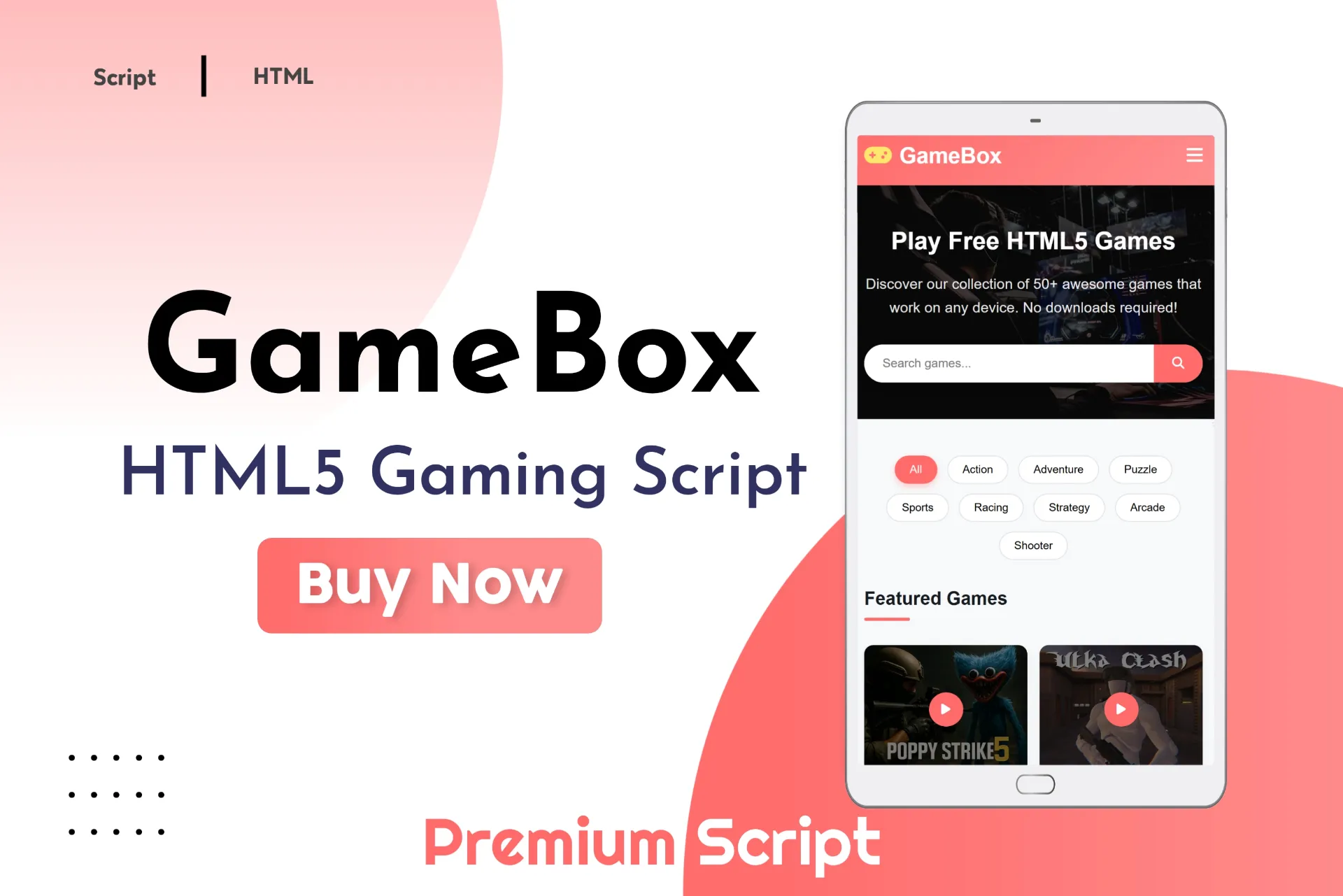
GameBox – HTML5 Script
- 50+ premium HTML5 games – completely free with zero ads
- Instant play – no downloads, no waiting, works on any device
- Fullscreen mode and responsive game viewer for total immersion
- 8 categories: Action, Adventure, Puzzle, Sports, Racing, Shooter, Arcade & Strategy
- Powerful search bar + category filters for instant discovery
- Add/remove favorites with one click (saved locally forever)
- Recently played section – jump back into your last games instantly
- Beautiful modern design with hover effects and smooth animations
- Fully mobile-optimized – perfect on phones and tablets
- Lifetime Access
- 6 Months Support
- Commercial License
- Instant Download
- Regular Updates
- Well Documentation
Description
GameBox – Modern Online Gaming Website Template
Launch your own gaming website with GameBox, a modern HTML, CSS, and JavaScript website template designed for showcasing browser-based games. With a vibrant interface, colorful game cards, category filters, search functionality, and an interactive game viewer, GameBox provides a convenient starting point for building an engaging online gaming portal.
🎮 Attractive Gaming Website Design
GameBox features a colorful interface with a coral-red header, turquoise accents, attractive game thumbnails, and smooth hover animations. The homepage includes featured games, recently played games, category-based collections, and a dedicated favorites section. Its sticky navigation and organized layout help visitors explore the website more comfortably.
🔎 Smart Search and Game Categories
Make game discovery easier with the built-in search field and category filters. The template organizes games into categories such as action, adventure, arcade, puzzle, racing, shooting, sports, and strategy. Visitors can search by game title, mark favorites, and access recently played games through the dedicated interface.
🕹️ Interactive Game Viewer
The integrated game viewer opens selected games in an overlay using an iframe. Visitors can close the viewer or switch to fullscreen mode for a more immersive experience. Game cards feature thumbnails, titles, category labels, and interactive play and favorite controls.
💻 Easy Customization and Integration
Built with standard HTML, CSS, and JavaScript, GameBox is suitable for developers, gaming bloggers, and entrepreneurs who want to customize a browser-based gaming website. The ZIP package includes index.html, organized game-thumbnail folders, and desktop and mobile preview images.
Customize the branding, colors, game listings, thumbnails, and embed URLs to suit your project.
Important: GameBox is a website template, not a complete gaming backend. Configure valid game URLs and verify asset usage permissions before publishing. Actual gameplay depends on compatible, accessible game embeds.
Key Features
- Modern gaming website layout with colorful game cards
- Search functionality for finding games by title
- Category filters for multiple gaming genres
- Featured, recently played, and favorites sections
- Interactive game viewer with iframe integration
- Fullscreen game viewing and mobile navigation toggle
- Organized game-thumbnail assets with desktop and mobile previews
Installation Guide
- Download the GameBox ZIP package to your computer.
- Extract the ZIP file into a folder while preserving the original directory structure.
- Open `index.html` in a modern web browser to preview the website.
- Upload the extracted files and folders to your web hosting account using the hosting file manager or FTP client.
- Keep the `image` directory and its category subfolders intact so the game thumbnails load correctly.
- Open `index.html` in a code editor to customize the website name, colors, navigation, game titles, and category listings.
- Configure valid game embed URLs and verify that each game works correctly in the iframe viewer.
- Test the search, category filters, favorites, recently played section, mobile navigation, and fullscreen controls.
- Check the website on desktop and mobile devices, then publish it after confirming that all required assets and game links work.
Related products
-
 View Details
₹299.00₹99.00 -
 View Details
₹299.00₹99.00 -
 View Details
₹299.00₹99.00 -
 View Details
₹299.00₹99.00

Reviews
There are no reviews yet.