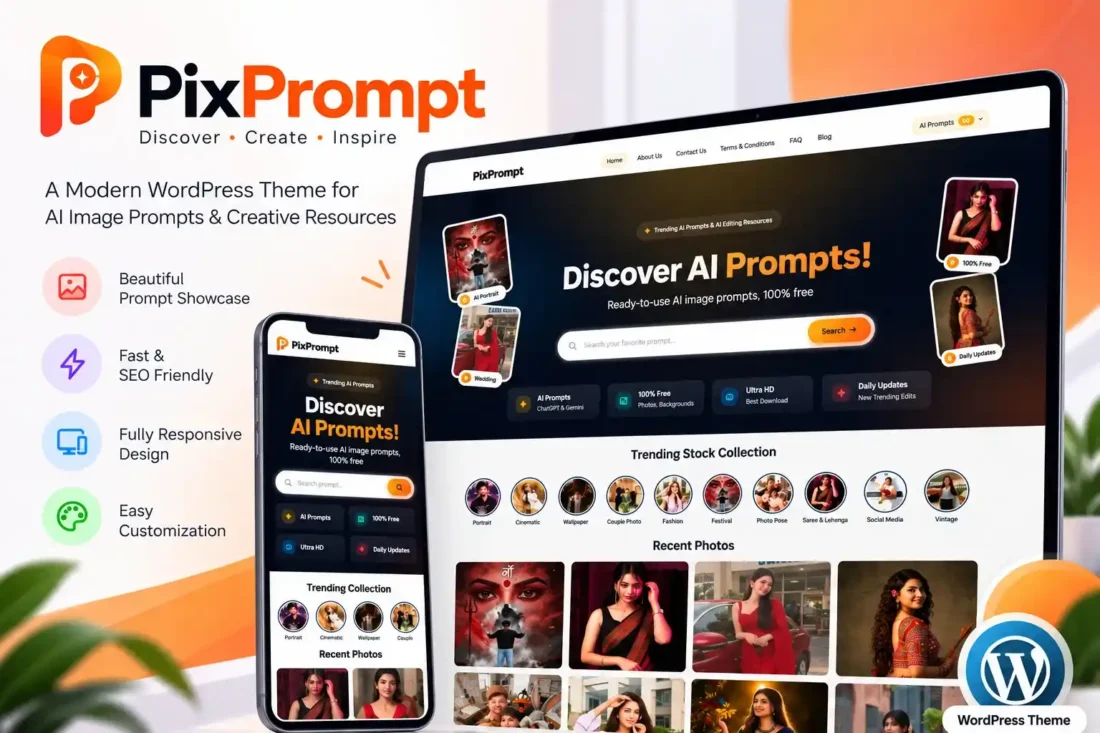
PixPrompt WordPress Theme – AI Prompts & Free Stock Photo Gallery
- Modern WordPress theme for AI prompts
- Free stock photo gallery with categories
- Copy-ready prompts for creative inspiration
- Trending collections and interactive search
- Customizable colors, hero, and homepage sections
- ZIP import and export for prompts
- Lifetime Access
- 6 Months Support
- Commercial License
- Instant Download
- Regular Updates
- Well Documentation
Description
Build a Modern AI Prompt Website
Create a stylish creative resource website with PixPrompt, a modern WordPress theme designed for AI prompt libraries, free stock photo galleries, and AI image editing inspiration. Its dark hero section, vibrant yellow and orange accents, and clean photo grid create an engaging browsing experience for visitors on desktop and mobile devices.
AI Prompts and Photo Collections
PixPrompt includes a dedicated AI Prompts content system with prompt details, individual prompt pages, and trending collections. Publish ready-to-copy prompts and organize creative resources into collections. The theme also supports standard WordPress posts with featured images, allowing you to build a photo gallery with category-based browsing.
Interactive Homepage and Search
Present your content through a customizable hero section with search, trending tags, category story circles, recent photos, trending collections, and AI prompt cards. You can enable or disable homepage sections, adjust section headings, and configure the prompt display order from the WordPress Customizer.
Easy Customization and Content Transfer
Personalize your website with primary and secondary colors, hero text, image shapes, social links, footer content, and navigation menus. Highlight a menu item with a HOT badge using the menu-hot CSS class. The built-in Export / Import tool lets you transfer prompts, collections, and associated images between compatible PixPrompt websites using a ZIP backup.
Ideal for Creative Publishers
PixPrompt is suitable for AI prompt creators, digital artists, bloggers, and stock photo publishers who want to combine prompt sharing with visual content discovery. Its responsive layout, copy-ready prompt cards, and customizable sections provide a flexible foundation for publishing creative resources through familiar WordPress tools.
Key Features
- Modern AI prompt and stock photo gallery design
- Dedicated AI Prompts system with prompt details
- Copy-ready AI prompt cards for visitors
- Trending collections and category story circles
- Customizable homepage sections, colors, and hero text
- ZIP export and import for prompts and collections
- Responsive layouts with search and social links
Installation Guide
- Download the `PixPrompt.zip` theme file to your computer.
- Log in to your WordPress Dashboard and navigate to Appearance → Themes → Add New Theme → Upload Theme.
- Click Choose File, select `PixPrompt.zip`, and click Install Now.
- After installation finishes, click Activate to enable the PixPrompt theme.
- Navigate to Settings → Permalinks and click Save Changes to refresh the custom prompt URLs.
- Go to Posts → Categories to create photo categories. Add a cover image to each category to display it in the homepage category story circles.
- Open Posts → Add New Post to publish photos. Add a title, featured image, content, and category, then publish the post.
- Navigate to AI Prompts → Add New to create your first prompt. Enter the title and complete the Prompt Details box, then publish the prompt.
- Create and organize your collections using the Trending Collections feature so visitors can browse related prompts and creative resources.
- Go to Appearance → Menus to create your navigation menus and assign them to the Primary Menu and footer menu locations.
- Open Appearance → Customize to configure the hero text, search placeholder, trending tags, colors, homepage section visibility, section headings, and footer content.
- To transfer prompt content to another PixPrompt website, open Prompt Image → Export / Import and download a ZIP backup containing prompts, collections, and images.
- On the destination website, install and activate PixPrompt, open Prompt Image → Export / Import, and upload the compatible ZIP backup.
- Visit your homepage, photo categories, individual prompt pages, and collection sections to verify that everything displays correctly.
- Test the search, prompt copying, navigation menus, responsive layouts, and imported images on desktop and mobile devices before launching your website.
Related products
-
 View Details
₹2,599.00₹499.00 -
 View Details
₹999.00₹249.00 -
 View Details
₹2,599.00₹399.00 -
 View Details
₹2,599.00₹399.00

Reviews
There are no reviews yet.