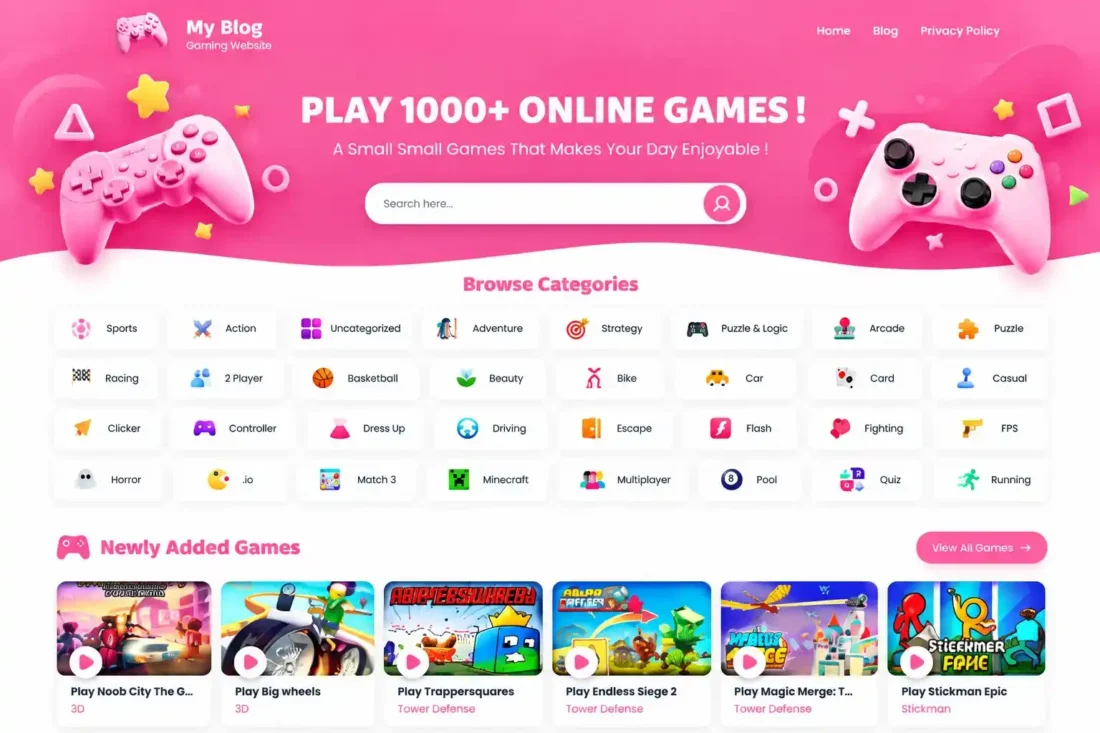
Gamenova – Modern WordPress Gaming Theme
-
Modern design for gaming websites and blogs
-
Responsive layout for all screen sizes
-
Dedicated templates for game posts
-
Customizable colors, branding, and homepage sections
-
Built-in backup and import game content
-
Organized categories for easy game discovery
- Lifetime Access
- 6 Months Support
- Commercial License
- Instant Download
- Regular Updates
- Well Documentation
Description
GameNova – Modern WordPress Gaming Website Theme
Launch an engaging gaming website with GameNova, a modern and responsive WordPress theme designed for online game portals, browser gaming websites, gaming communities, and entertainment blogs. With its vibrant gaming-inspired design, dedicated game pages, organized categories, and customizable homepage, GameNova provides a practical foundation for building a professional gaming platform.
🎮 Dedicated Game Management
GameNova includes a dedicated game content type, allowing you to manage gaming content separately from standard blog posts. Create individual game pages, organize titles into game categories, and assign featured images to make your gaming library easier to browse. Category image management also lets you add custom visuals to your game category listings.
🎨 Modern Design and Customization
Give your website a distinctive appearance with GameNova’s gaming-focused visual style, custom branding options, and responsive layouts. Through the WordPress Theme Customizer, you can personalize supported design settings to match your brand. The theme includes navigation menus, featured images, custom typography, and styling resources that help create a consistent experience across your website.
📰 Built-In Blog and Category Archives
GameNova supports standard WordPress posts alongside its dedicated gaming content. The included blog page template features a modern four-column post grid, while individual blog posts use an article layout with featured images, post metadata, tags, navigation, and a latest-post sidebar. Dedicated game category archives help visitors explore related games through a separate URL structure.
⚙️ Built-In Game Backup and Restore
Manage your gaming content more conveniently with the theme’s built-in backup tools. Export game posts, metadata, categories, category images, featured images, and GameNova Customizer settings into a ZIP backup. Import a previously exported backup through the WordPress dashboard, with existing games updated instead of duplicated when matching records are found.
GameNova is suitable for gaming bloggers, browser-game publishers, and developers building a dedicated online gaming portal.
Note: This is a WordPress theme, not a collection of playable games. You must add your own game content and configure your website before launch.
Key Features
- Modern, responsive design for gaming portals and entertainment websites
- Dedicated Game post type with individual game pages
- Game categories with custom category image management
- Built-in backup and restore for game content and related media
- Modern four-column blog template and structured single-post layout
- WordPress Customizer settings for branding and supported design options
- Separate game category archives and standard WordPress blog categories
Installation Guide
- Download the GameNova theme ZIP file and keep a backup copy.
- Log in to your WordPress administration dashboard.
- Navigate to Appearance → Themes → Add New Theme → Upload Theme.
- Select the GameNova ZIP file, click Install Now, and wait for installation to finish.
- Activate GameNova and open your website to verify that the theme loads correctly.
- Navigate to Appearance → Customize and configure the available branding, color, and design settings.
- Create game entries using the dedicated game content section in your WordPress dashboard.
- Create game categories, upload category images, and assign relevant games to each category.
- Add featured images and configure individual game pages with your own game content.
- Create and assign your navigation menus, then configure the Blog page and publish standard WordPress posts if needed.
- Use the Gamenova admin menu to export a backup after adding your content, and test backup restoration on a staging site when possible.
- Review the homepage, game pages, category archives, blog layout, and mobile responsiveness before publishing.
Related products
-
 View Details
$29.53$11.35 -
 View Details
$29.53$5.10 -
 View Details
$29.53$5.67 -
 View Details
$56.81$17.03

Reviews
There are no reviews yet.