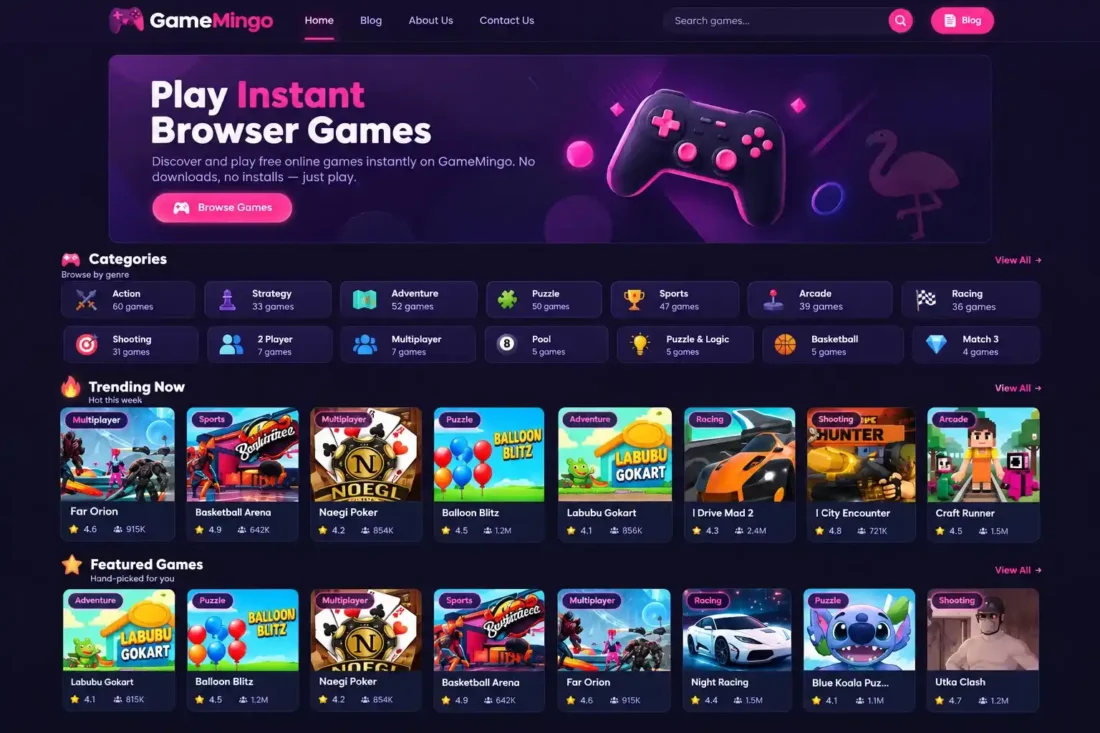
GameMingo WordPress Theme
- Modern WordPress theme for browser gaming websites
- Dedicated game library with categories and tags
- Custom game pages with embed code support
- Responsive dark design with vibrant accent colors
- Customizable colors, logos, and thumbnail ratios
- Backup ZIP containing 437 games and media
- Lifetime Access
- 6 Months Support
- Commercial License
- Instant Download
- Regular Updates
- Well Documentation
Description
Build Your Own Gaming Website
Launch a browser-gaming portal with GameMingo, a modern WordPress theme designed for online game websites, arcade portals, and gaming communities. Its dark interface, vibrant accent colors, and responsive layouts create an engaging environment where visitors can discover games and enjoy a dedicated gaming experience.
Dedicated Game Management
GameMingo introduces a custom Games content system with individual game pages, game categories, native WordPress tags, featured thumbnails, ratings, reviews, and play counts. Each game can include a short description, gameplay instructions, controls, features, tips and tricks, FAQs, and a dedicated game embed code field.
Modern Design and Customization
Customize your website using the WordPress Customizer. Adjust background, card, navigation, accent, and button colors, choose game-card thumbnail ratios, and configure your logo size. Responsive game archives, search functionality, related game content, and immersive game detail pages help visitors navigate your collection across desktop and mobile devices.
Full Demo Backup with 437 Games
This bundle includes a separate GameMingo backup ZIP containing 437 game entries and associated media files. Import the backup through the theme’s Game Backup interface to populate your website with demo game content. The importer matches existing games by slug, updating matching entries instead of creating duplicates.
Straightforward Installation and Restoration
Install and activate the GameMingo WordPress theme, refresh your permalink settings, and open the Games menu to manage your collection. Use Appearance → Theme Backup to import or export game data, metadata, categories, and featured media. The theme is a practical starting point for gaming bloggers, developers, and publishers who want a ready-to-populate browser-game website with dedicated content management tools.
Key Features
- Modern dark gaming interface with vibrant accent colors
- Dedicated game management with custom post types
- Game pages with embed codes and gameplay instructions
- Game categories, tags, ratings, reviews, and plays
- Customizable theme colors and thumbnail aspect ratios
- Responsive game archives with search and related games
- Backup ZIP containing 437 game entries and media
Installation Guide
- Download the GameMingo theme ZIP and the separate GameMingo backup ZIP to your computer.
- Log in to your WordPress Dashboard and navigate to Appearance → Themes → Add New Theme → Upload Theme.
- Select the GameMingo theme ZIP file, click Install Now, and then click Activate.
- Navigate to Settings → Permalinks and click Save Changes to refresh the website's URL structure.
- Open Appearance → Theme Backup to access the GameMingo backup and restore interface.
- Under Import / Restore, select the `GameMingo-backup.zip` file from your computer.
- Click the import button and wait for the game data and media import process to finish.
- Review the import results and check whether any games or media files failed to import.
- Open Games → All Games to review the imported game entries and their details.
- Navigate to Games → Game Categories to organize your game collection into relevant categories.
- Go to Appearance → Customize to adjust theme colors, logo size, and game-card thumbnail aspect ratios.
- Navigate to Appearance → Menus to create and assign your primary and footer navigation menus.
- Visit the homepage, game archives, individual game pages, and category pages to verify the imported content.
- Test the game embed codes, navigation, search, and responsive layouts on desktop and mobile devices.
- Keep both ZIP files as backups so you can reinstall the theme or restore demo content when needed.
Related products
-
 View Details
৳ 3,603৳ 622 -
 View Details
৳ 1,385৳ 345 -
 View Details
৳ 3,603৳ 692 -
 View Details
৳ 3,603৳ 622

Reviews
There are no reviews yet.