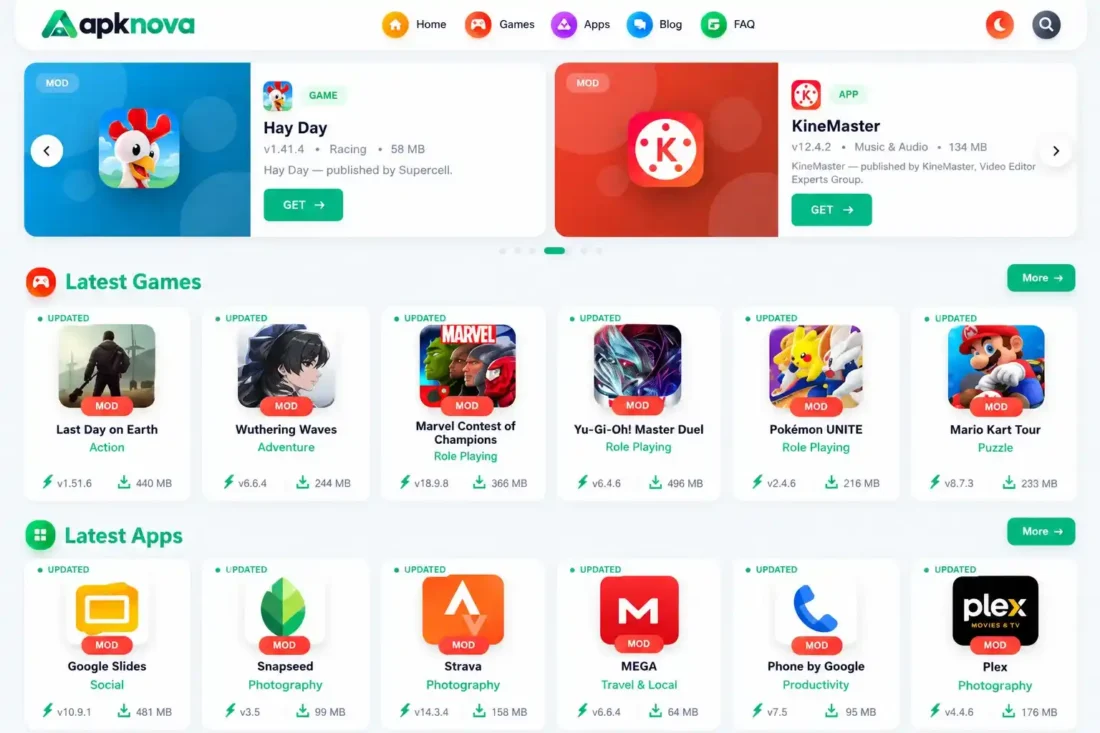
APKNova WordPress Theme – Apps & Games Download Website
- Lifetime Access
- 6 Months Support
- Commercial License
- Instant Download
- Regular Updates
- Well Documentation
Description
APKNova – Modern WordPress Theme for Apps & Games
Build a professional app and game download website with APKNova, a modern WordPress theme designed for Android app directories, APK download portals, and gaming websites. Its responsive layout, dedicated content types, customizable design settings, and specialized download pages provide a practical foundation for organizing and showcasing apps and games.
📱 Dedicated Apps and Games Management
APKNova includes separate Apps and Games content types, allowing you to manage applications and games independently of regular blog posts. Organize content into categories, add featured images, and display useful details such as ratings and file sizes. Dedicated templates help visitors browse listings and explore individual app or game pages.
🎨 Customizable Homepage and Design
Create a distinctive website using configurable homepage sections for latest apps, latest games, and their respective categories. The theme includes customization options for primary and secondary colors, header and footer backgrounds, body background, and button styles. Custom logo support and responsive layouts help maintain a consistent appearance across desktop and mobile devices.
⬇️ Dedicated Download Pages
APKNova includes a dedicated download-page template and supporting JavaScript for download-related interactions. You can organize application and game information around individual pages and customize the presentation to suit your website’s content. Rating functionality is also supported through WordPress AJAX integration.
⚙️ WordPress-Friendly Setup
Built for WordPress, APKNova supports featured images, custom navigation menus, search, standard blog posts, category archives, author pages, and FAQ content. Its separate CSS and JavaScript assets help organize the theme’s styling and interactive features.
Whether you are launching an APK directory, an app discovery website, or a gaming download portal, APKNova offers a flexible starting point for presenting your content in a structured and engaging way.
Note: APKNova is a WordPress theme, not a collection of apps or games. You will need to install WordPress and add your own content before launching your website.
Key Features
- Separate Apps and Games custom post types
- Dedicated app and game pages with category organization
- Customizable homepage sections for latest apps, latest games, and categories
- Theme settings for colors, backgrounds, button styles, and branding
- Dedicated download-page template with supporting JavaScript
- Rating functionality with WordPress AJAX integration
- Responsive layouts with search, blog, author, archive, and FAQ templates
Installation Guide
- Download the APKNova theme ZIP file from your purchase or download page and keep an original copy as a backup.
- Ensure your website runs WordPress 6.0 or later and PHP 7.4 or later. Use a permalink structure other than Plain for proper URL functionality.
- Log in to your WordPress Dashboard and navigate to Appearance → Themes → Add New Theme → Upload Theme. Select `apknova.zip`, click Install Now, and then click Activate.
- Go to Settings → Permalinks, select your preferred structure, such as Post name, and click Save Changes to refresh the rewrite rules.
- Open Theme Settings and customize the site colors, header and footer backgrounds, button styles, logo, favicon, and SEO title format.
- Navigate to Appearance → Menus and create or edit your primary navigation menu. Add the required pages and assign the menu to the Primary Menu location. Configure optional SVG icons and gradient styles if needed.
- Go to Games → Add New Game or Apps → Add New App. Enter the title and description, upload a featured image, assign a category, complete the App/Game Details fields, add screenshot image URLs, and publish your content.
- Open Theme Settings → Homepage Sections to enable or disable homepage sections and choose how many items to display. Configure the Featured Slider by selecting the games or apps you want to feature.
- Configure the download waiting time under Theme Settings → Downloads. Add your advertising code to the required ad positions and enable each position. Replace the default footer, legal, and social links with your own URLs.
- Review the FAQ page and customize its questions and answers. Publish your blog posts, About page, Privacy Policy, and any other supporting pages required for your website.
- To restore an APKNova backup ZIP, open Theme Settings → Import / Export and use the import option. You can also export your apps, games, categories, media, metadata, and theme settings for backup purposes.
- Before launching, test the homepage, app and game archives, individual detail pages, download pages, blog, and FAQ. Check navigation, search, ratings, download redirects, download counters, advertisements, and mobile responsiveness.
- **Important:** Do not modify the Theme Name, Theme URI, Author, or Author URI fields in `style.css`. APKNova verifies these values and may stop loading if they are changed.
Related products
-
 View Details
৳ 3,603৳ 553 -
 View Details
৳ 3,603৳ 1,385 -
 View Details
৳ 3,603৳ 1,385 -
 View Details
৳ 3,603৳ 622

Reviews
There are no reviews yet.