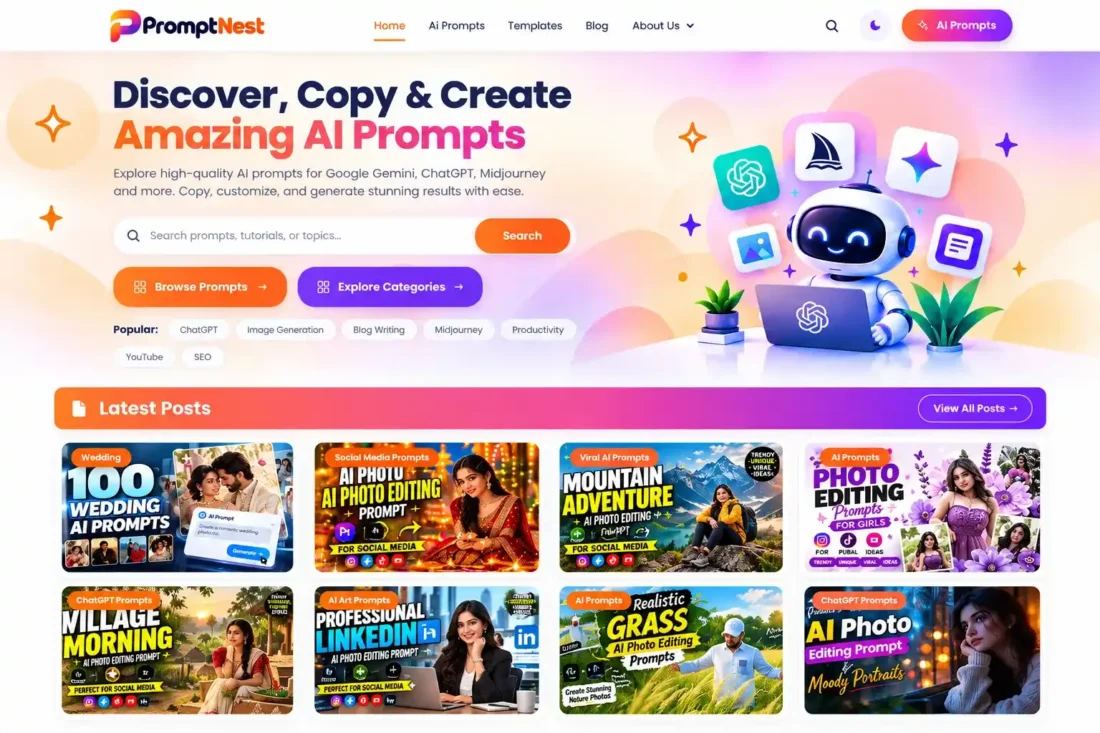
PromptNest – AI Prompts WordPress Theme
- Modern & Clean Website Design
- Fully Responsive Across All Devices
- Beautiful AI Prompt Listing Layouts
- Easy Customization And Management
- SEO-Friendly & Lightweight Performance
- Dark Mode And Light Mode Support
- Lifetime Access
- 6 Months Support
- Commercial License
- Instant Download
- Regular Updates
- Well Documentation
Description
PromptNest – Modern AI Prompt WordPress Theme
Build a professional AI prompt website with PromptNest, a modern and customizable WordPress theme designed for ChatGPT prompts, Midjourney prompts, AI tools, tutorials, SEO resources, and technology blogs. Its attractive homepage, organized content grid, interactive prompt cards, and flexible customization options make it an excellent starting point for creating an AI-focused content platform.
🤖 Interactive AI Prompt Cards
PromptNest transforms code and preformatted blocks inside posts into collapsible AI PROMPT cards. Visitors can view the full prompt, hide it, or copy its content with dedicated buttons. This makes prompts easier to read, organize, and reuse. An automatic table of contents is also generated from H2 headings when a post contains at least two headings.
🎨 Modern Homepage and Flexible Layouts
The homepage includes a customizable hero section with search, popular topic chips, call-to-action buttons, and a responsive post grid. You can adjust post card elements, image aspect ratios, grid columns, spacing, and sidebar visibility through the WordPress Customizer. Featured images, category badges, and popular post rankings help visitors discover relevant content.
📩 Built-In Newsletter and Content Management
The theme includes a newsletter subscription box that stores subscriber email addresses in your WordPress database. Manage subscribers through the dashboard, search records, delete entries, and export subscriber data as CSV. Additional features include author boxes with social profiles, related posts, category navigation, and customizable footer content.
⚙️ Easy WordPress Customization
PromptNest supports custom logos, navigation menus, featured images, responsive layouts, and standard WordPress posts and pages. Its settings let you personalize hero text, images, social links, newsletter actions, sidebar widgets, and homepage content without manually editing every template.
Whether you are launching an AI prompt library or expanding a technology blog, PromptNest provides a practical foundation for publishing and organizing AI-related content.
Note: This is a WordPress theme, not a standalone website builder or AI generator. WordPress installation and content setup are required.
Key Features
- Modern homepage with hero search, popular topic chips, and responsive post grid
- Interactive AI PROMPT cards with View, Hide, and Copy buttons
- Automatic table of contents generated from H2 headings
- Customizable post cards, image ratios, grid columns, and sidebar settings
- Built-in newsletter subscriber management with search and CSV export
- Popular posts, related posts, category navigation, and author profiles
- WordPress Customizer options for hero content, colors, social links, and footer settings
Installation Guide
- Download the PromptNest theme ZIP file and keep a backup copy.
- Log in to your WordPress administration dashboard.
- Navigate to Appearance → Themes → Add New Theme → Upload Theme.
- Select the PromptNest ZIP file, click Install Now, and activate the theme.
- Open Settings → Reading and configure your homepage display preference.
- Navigate to Appearance → Menus, create your Primary Menu and Footer Quick Links menu, and assign them to the correct locations.
- Open Appearance → Customize → PromptNest Options to configure the hero section, social links, footer text, sidebar widgets, post cards, and grid columns.
- Create categories such as ChatGPT Prompts, Midjourney Prompts, AI Tools, and SEO Prompts, then publish your content with featured images.
- Use code or preformatted blocks inside posts for collapsible AI PROMPT cards, and add H2 headings to generate the automatic table of contents.
- Configure the newsletter form action and test subscriber management, CSV export, search, navigation, and responsive layouts before publishing.
- Keep the original theme header information in style.css unchanged, because the theme includes a guard that locks the front end if those specific details are modified.
Related products
-
 View Details
₹2,599.00₹449.00 -
 View Details
₹2,599.00₹449.00 -
 View Details
₹2,599.00₹399.00 -
 View Details
₹2,599.00₹449.00

Reviews
There are no reviews yet.