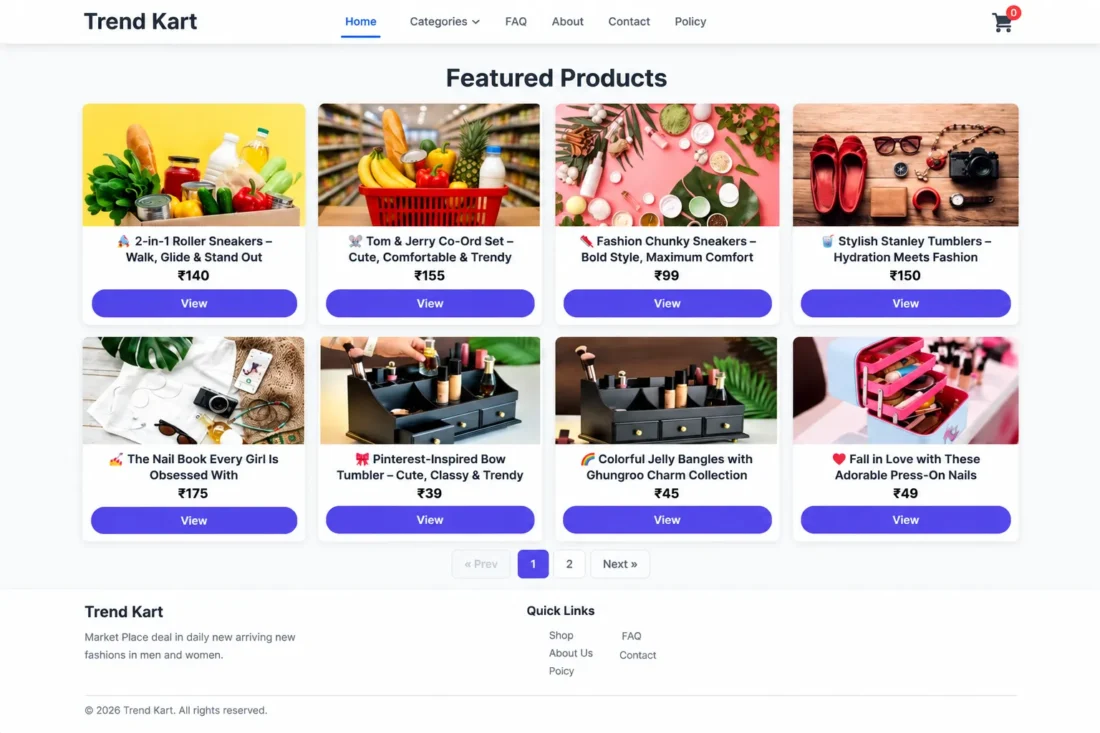
Trend Kart WordPress eCommerce Theme – (Best For ADX/AdSense Loading Arbitrage)
- Modern WordPress theme for online stores
- Standalone product catalog without WooCommerce
- Interactive product pages with gallery images
- Session-based shopping cart and checkout
- Cash on Delivery with order management
- Responsive design with customizable navigation
- Lifetime Access
- 6 Months Support
- Commercial License
- Instant Download
- Regular Updates
- Well Documentation
Description
Build a Modern Online Store
Create a clean, responsive shopping website with Trend Kart, a standalone WordPress eCommerce theme designed for product catalogs and streamlined online shopping. Its modern layout, interactive product cards, and mobile-friendly interface help you showcase products and provide customers with a simple shopping experience.
Independent Product Management
Trend Kart includes its own Products system, so WooCommerce is not required. Add products directly from your WordPress Dashboard with a title, featured image, price, and optional product category. You can also provide additional gallery images to display more product views on individual product pages.
Shopping Cart and Step-by-Step Checkout
The theme features a session-based shopping cart that lets customers review products and adjust quantities without requiring an account. Its dedicated checkout guides customers through separate steps for their name, address, city, state, PIN code, country, phone number, and email. Customers can review their order details before placing an order using the currently supported Cash on Delivery method.
Order Management and Store Pages
When a customer places an order, Trend Kart creates an order record in your WordPress Dashboard. Each order stores customer information, a snapshot of the purchased items, and the order total. Create the required FAQ, About Us, Contact Us, and Policies pages to complete your storefront and provide essential information to shoppers.
Flexible Design and Navigation
Customize your store with a site logo, primary and footer menus, responsive layouts, and modern styling. Product categories help organize your catalog, while the theme’s interactive interface supports a smooth browsing experience on desktop and mobile devices.
Trend Kart is a practical choice for store owners who want a lightweight, independent WordPress shopping setup without installing WooCommerce.
Key Features
- Modern responsive design for independent online stores
- Built-in product catalog without WooCommerce dependency
- Session-based shopping cart with quantity adjustment
- Multi-step checkout for customer and delivery details
- Cash on Delivery ordering with admin order records
- Product categories and additional gallery image support
- Customizable logo, navigation menus, and store styling
Installation Guide
- Download the Trend Kart theme ZIP file to your computer.
- Log in to your WordPress Dashboard and navigate to Appearance → Themes → Add New Theme → Upload Theme.
- Select the `trend-kart.zip` file, click Install Now, and then click Activate.
- Navigate to Settings → Permalinks and click Save Changes to refresh the URLs for the cart and checkout pages.
- Go to Products → Add New Product in your WordPress Dashboard to create your first product.
- Enter the product title, set the price, upload a featured image, and assign a product category if required.
- Add additional gallery images using the Extra Gallery Image IDs field if you want to display more product thumbnails.
- Create four WordPress pages with these exact URL slugs: `faq`, `about-us`, `contact-us`, and `policies`.
- Navigate to Appearance → Menus and create your primary and footer menus. Assign them to the appropriate menu locations.
- Visit your website and open a product page to confirm that the product details, price, and images display correctly.
- Add a product to the cart and test quantity adjustment and the cart page.
- Proceed through each checkout step, enter the customer and delivery details, and review the order before placing it.
- Complete a test order using Cash on Delivery and verify that the order appears under Orders in your WordPress Dashboard.
- Review the FAQ, About Us, Contact Us, and Policies pages and confirm that the header and footer links work correctly.
- Test the storefront on desktop and mobile devices before making it available to customers.
- Important: Trend Kart operates independently of WooCommerce. The current checkout supports Cash on Delivery; payment gateway integration and order email notifications require additional development.
Related products
-
 View Details
₹2,599.00₹449.00 -
 View Details
₹2,599.00₹399.00 -
 View Details
₹2,599.00₹399.00 -
 View Details
₹2,599.00₹999.00

Reviews
There are no reviews yet.