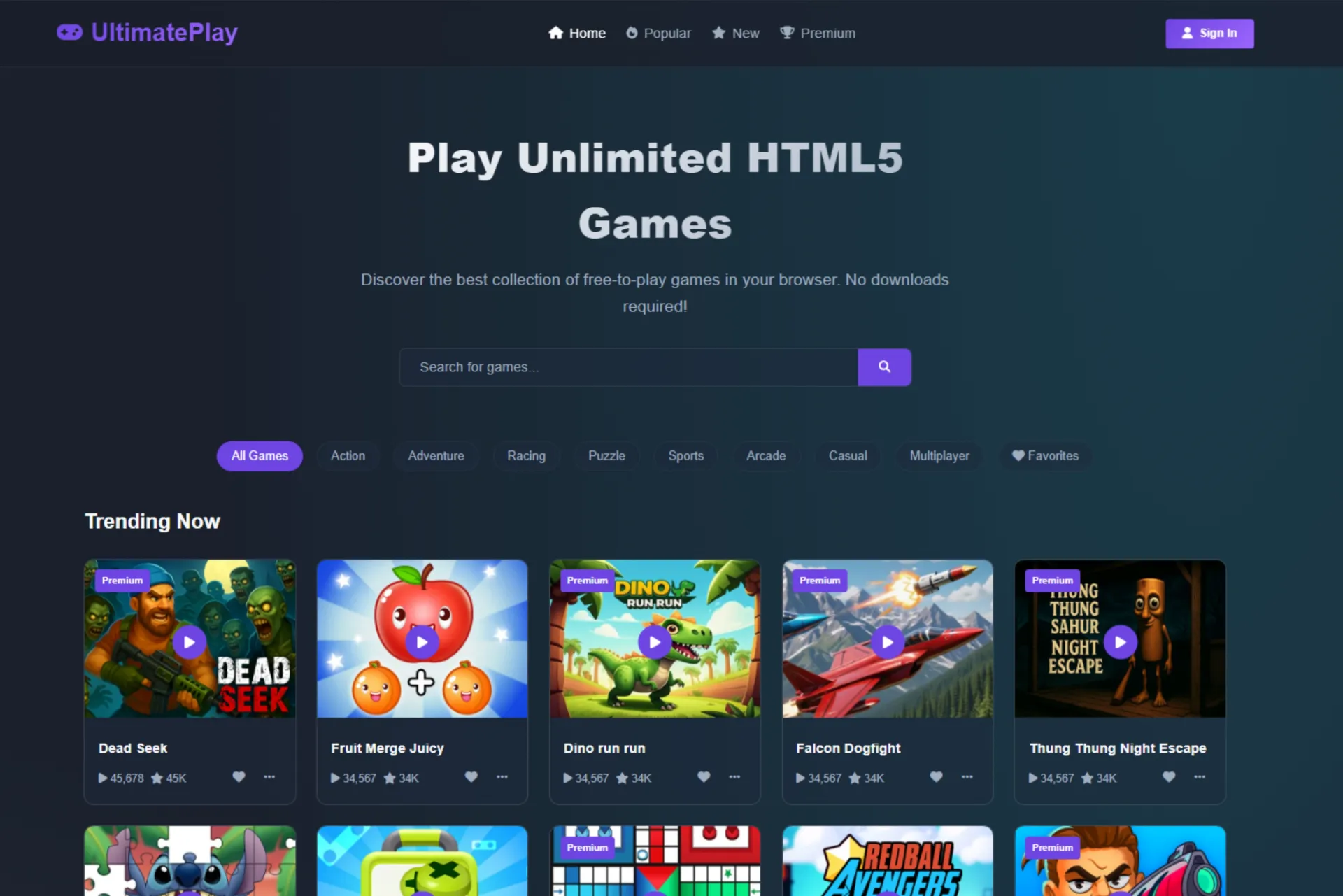
UltimatePlay – HTML5 Script
- 50+ premium HTML5 games – completely free & ad-free
- Stunning dark glass-morphic design with cosmic gradients & blur effects
- Smart responsive fullscreen player with automatic scaling
- One-click favorites with heart animation (saved locally forever)
- Powerful instant search + elegant category filtering
- Premium game badges & play count statistics
- Beautiful login modal with social sign-in options
- Detailed popup modals for Privacy, Terms, About & Contact
- Fully mobile-optimized with perfect touch experience
- Single HTML file – save offline or host anywhere instantly
- Lifetime Access
- 6 Months Support
- Commercial License
- Instant Download
- Regular Updates
- Well Documentation
Description
UltimatePlay – Premium HTML5 Gaming Website Template
Launch your own online gaming portal with UltimatePlay, a modern, dark-themed gaming website template designed to showcase browser games through an attractive, organized interface. Featuring vibrant purple accents, interactive game cards, category filters, and a built-in search interface, this template provides a professional starting point for gaming websites, game directories, and online entertainment platforms.
🎮 Modern Gaming Interface
UltimatePlay features a sleek dark design with gradient backgrounds, glass-style cards, smooth hover effects, and prominent game thumbnails. Each game card displays its title, category-based organization, and additional interface elements, creating an engaging browsing experience for visitors exploring your gaming collection.
🔍 Search and Game Categories
The template includes a search interface and category navigation to help visitors discover games more conveniently. Its collection is organized into categories such as Action, Shooting, Adventure, Casual, and Racing. Interactive elements, including favorite controls and game-card actions, add functionality to the browsing interface.
🖼️ Extensive Game Image Collection
The package includes numerous game thumbnail images arranged in category-specific folders. These assets help you populate the website with visual content and organize your game collection. You can replace existing images, update game names, and customize the displayed information to match your project.
📱 Responsive Design and Easy Customization
Built with HTML, CSS, and JavaScript, UltimatePlay uses a responsive grid layout designed to adapt to different screen sizes. The source code includes customizable colors, typography, navigation, and card styling, allowing you to adjust the appearance to suit your brand.
This template is ideal for developers, gaming bloggers, and entrepreneurs looking for a foundation for an online gaming directory.
Important: The package provides a website template and game images, not a complete game-hosting backend. Verify game links, implement any required game-launch functionality, and confirm image and game distribution rights before publishing.
Key Features
- Modern dark gaming interface with vibrant purple gradient accents
- Search interface for finding games by name
- Category navigation for Action, Shooting, Adventure, Casual, and Racing
- Interactive game cards with thumbnails, hover effects, and favorite controls
- Responsive grid layout for desktop and mobile screens
- Large collection of game images organized into category folders
- Customizable HTML, CSS, and JavaScript source code
Installation Guide
- Download the UltimatePlay ZIP package.
- Extract the ZIP archive while preserving the original folder structure.
- Upload index.html and the image folders to your web hosting directory.
- Keep the image folders in their original locations so the existing thumbnail paths continue to work.
- Open index.html in a code editor to review the layout, game data, and JavaScript functionality.
- Update game titles, categories, thumbnails, and other displayed information to match your collection.
- Configure game-card actions and add valid game URLs or launch functionality where required.
- Customize the website branding, colors, typography, and layout in the HTML and CSS.
- Test the search interface, category filters, favorite controls, and navigation in a browser.
- Check image loading and responsive behavior on desktop and mobile devices before publishing.
Related products
-
 View Details
৳ 415৳ 137 -
 View Details
৳ 415৳ 137 -
 View Details
৳ 415৳ 137 -
 View Details
৳ 415৳ 137

Reviews
There are no reviews yet.