
TinyURL – Free URL Shortener Script
-
Fast, reliable URL shortening
-
Secure and encrypted links
-
Detailed link analytics
-
Password protection and expiration
-
QR code generation
-
Team collaboration tools
-
Custom branding options
-
Developer-friendly API access
-
Free and premium plans
-
Easy social media sharing
- Lifetime Access
- 6 Months Support
- Commercial License
- Instant Download
- Regular Updates
- Well Documentation
Description
TinyURL URL Shortener Script – Modern Link Shortening Website Template
Launch Your Own URL Shortening Website
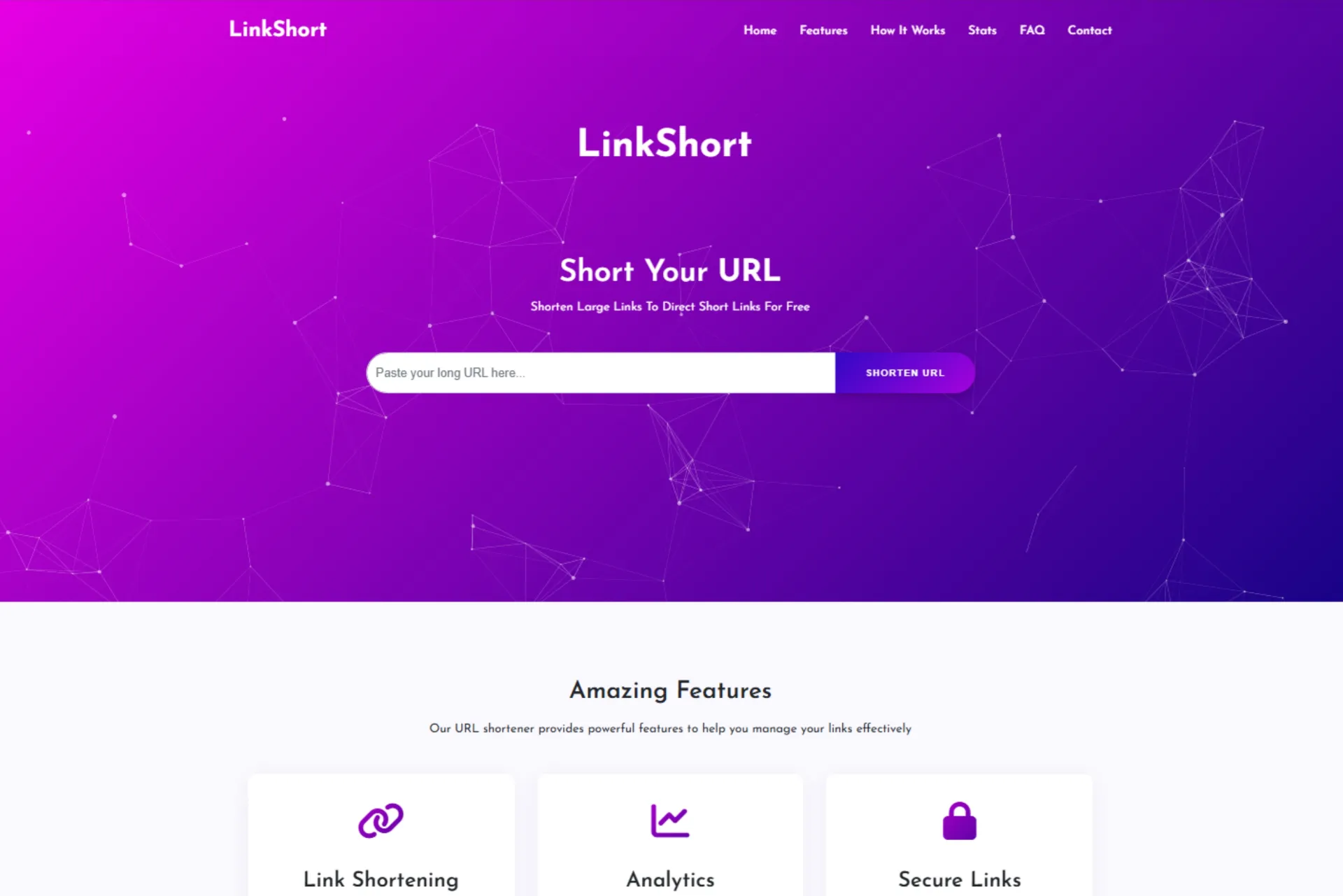
Create a professional link management website with this Free URL Shortener Script, a modern, responsive HTML, CSS, and JavaScript template designed around a simple URL shortening interface. With its polished layout, gradient styling, animated elements, and clear calls to action, it provides an attractive starting point for entrepreneurs, developers, marketers, and businesses building an online link utility website.
Simple URL Shortening Functionality
The included JavaScript allows visitors to enter a long URL and request a shorter link through external shortening services. It attempts TinyURL first and then uses is.gd as a fallback. Once a shortened link is returned, visitors can copy it to their clipboard or reset the form to shorten another URL. The interface also includes loading feedback and basic input validation.
Modern Design and Engaging Sections
The homepage features a responsive navigation bar, URL input area, feature cards, expandable FAQ section, animated statistics, and a promotional call-to-action section. Particle effects, hover interactions, and smooth animations help create a contemporary user experience. Additional About, Contact, Privacy Policy, and Terms pages provide a foundation for essential website information.
Easy Customization and Deployment
Built with standard front-end technologies, the template is suitable for customization without requiring a PHP backend or database for its included functionality. You can update the branding, colors, text, contact details, navigation, and social links to match your project.
Important: This package is a front-end template, not a complete standalone URL-shortening platform. Shortening relies on third-party services, and the displayed analytics, statistics, password protection, QR codes, team collaboration, and API features are not implemented as working backend features in the included files. External services may also restrict browser requests. Review and test the functionality before launching your website.
Key Features
- Modern, responsive URL shortener website design
- JavaScript-based URL shortening using TinyURL with is.gd fallback
- Copy-to-clipboard button and reset option for shortened links
- Loading feedback and basic URL input validation
- Animated statistics, particle effects, and expandable FAQ section
- Includes Home, About, Contact, Privacy Policy, and Terms pages
- Easy-to-edit HTML, CSS, and JavaScript files with external font and icon resources
Installation Guide
- Download the ZIP package and extract the files to your computer.
- Choose a web hosting service or server that can serve static HTML, CSS, and JavaScript files.
- Upload `index.html`, `style.css`, `script.js`, and the included informational pages to your website directory.
- Keep the original file structure and confirm that stylesheet and JavaScript paths remain correct.
- Open `index.html` in a browser and test the URL input, Shorten button, copy button, and reset button.
- Verify that TinyURL and is.gd requests work in your target browser and hosting environment.
- Customize the website name, logo, colors, feature descriptions, FAQ content, contact details, social links, and footer information.
- Replace placeholder email addresses, telephone numbers, website URLs, and address details with your own information.
- Review the Privacy Policy and Terms pages and update them to reflect your actual service and data practices.
- Upload the customized files to your live hosting account and test navigation, responsive layouts, animations, and URL shortening on desktop and mobile devices.
Related products
-
 View Details
₹299.00₹99.00 -
 View Details
₹299.00₹99.00 -
 View Details
₹499.00₹149.00 -
 View Details
₹299.00₹99.00

Reviews
There are no reviews yet.