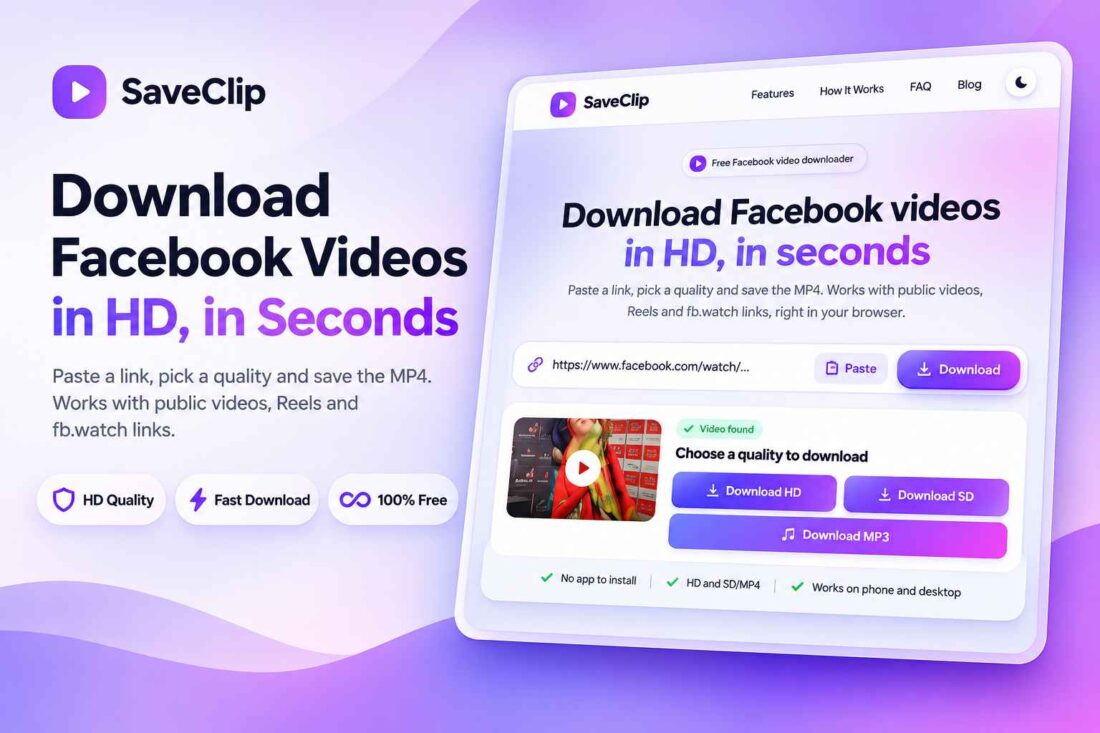
SaveClip – Facebook Video Downloader PHP Script
- Launch your own Facebook video downloader website
- Support HD and SD MP4 downloads
- Download supported Facebook Reels and videos
- Customize branding through the admin dashboard
- Manage advertisements, blogs, and custom pages
- No database required for website settings
- Lifetime Access
- 6 Months Support
- Commercial License
- Instant Download
- Regular Updates
- Well Documentation
Description
Launch Your Own Facebook Video Downloader Website
SaveClip is a standalone PHP script designed to help you build a modern Facebook video downloader website. Its clean interface and responsive layout make it a practical solution for entrepreneurs, developers, and website owners who want to launch a dedicated online video downloading service.
HD and SD Video Download Options
Give visitors a straightforward way to download supported Facebook videos. Users can paste a public Facebook video URL, Facebook Reel link, or supported fb.watch link into the download form. SaveClip is designed to provide available HD and SD MP4 download options, with video information displayed when it can be retrieved successfully.
Modern Design and Responsive Experience
The website features a polished interface with a prominent download form, clear instructions, feature sections, and frequently asked questions. Its responsive layout adapts to desktop computers, tablets, and mobile devices. Visitors can also switch between light and dark appearances for a more comfortable browsing experience.
Powerful Admin Dashboard
Manage your website through the built-in administration panel. Customize your website name, SEO title, meta description, logo, favicon, brand colors, navigation menus, footer, and social links. You can also manage blog posts, FAQs, custom pages, and advertising placements. The dashboard supports custom code settings and website maintenance mode, giving you greater control over your online platform.
Flexible PHP-Based Setup
SaveClip uses JSON files to store website settings and content, so a separate database is not required. It includes administrator login protection, password hashing, CSRF protection, and a settings backup workflow. Install it on compatible PHP hosting and configure your website through the dashboard.
Video extraction depends on Facebook’s availability and changing page structure. Private, restricted, or removed videos may not work. SaveClip is an independent product and is not affiliated with Facebook or Meta.
Key Features
- Facebook video downloader for public video links
- HD and SD MP4 download options
- Supports Facebook Reels and fb.watch links
- Responsive design with light and dark modes
- Admin dashboard for complete website customization
- Built-in blog, FAQ, and custom page management
- Advertising management with nine configurable ad placements
Installation Guide
- Download the SaveClip ZIP file and extract its contents on your computer.
- Upload all extracted files and folders to your hosting directory, such as `public_html`, using File Manager or an FTP client.
- Ensure your hosting supports PHP 7.4 or later and has the required PHP extensions, including cURL, enabled.
- Make sure Apache `mod_rewrite` is enabled if your hosting uses Apache, so clean URLs for pages and blog posts work correctly.
- Ensure the `admin/data/` directory is writable by PHP so the script can save website settings and administrator information.
- Ensure the `assets/uploads/` directory is writable by PHP to store uploaded logos, favicons, and other media files.
- Open `yourdomain.com/admin/` in your browser to access the administration dashboard.
- Log in with the default username `admin` and password `admin123`.
- Immediately change the default password in the Account & Security section when prompted.
- Configure your website name, SEO title, meta description, logo, favicon, brand colors, navigation menus, footer, and social links.
- Customize your homepage, blog, FAQ, custom pages, and advertising placements using the dashboard.
- Configure your advertising codes and optional analytics or custom scripts as needed.
- Visit your homepage and test the downloader with a publicly accessible Facebook video URL, Reel, or supported fb.watch link.
- Check the download options and test the website on desktop and mobile devices before launching it publicly.
Related products
-
 View Details
₹299.00₹99.00 -
 View Details
₹299.00₹99.00 -
 View Details
₹299.00₹99.00 -
 View Details
₹299.00₹99.00

Reviews
There are no reviews yet.