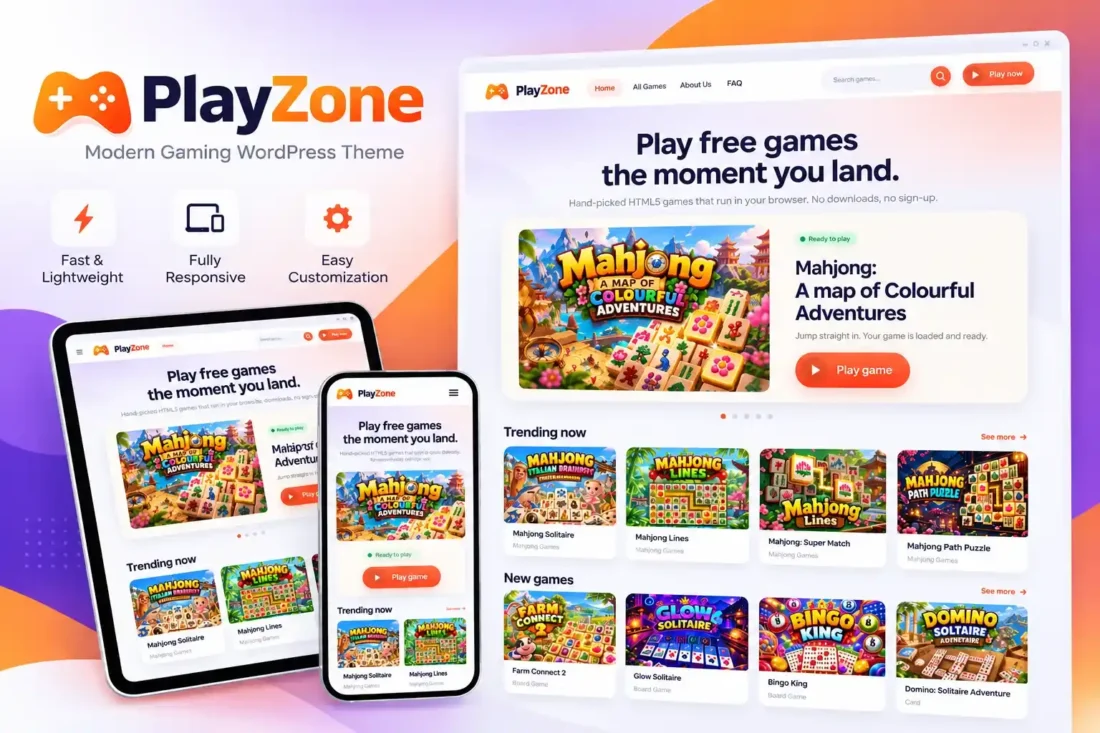
PlayZone – HTML5 Games WordPress Theme
- Build your own online gaming website
- Add games using URLs or iframe embeds
- Organize games with categories and tags
- Showcase featured and trending browser games
- Track plays, likes, and star ratings
- Export and import your complete game collection
- Lifetime Access
- 6 Months Support
- Commercial License
- Instant Download
- Regular Updates
- Well Documentation
Description
Build Your Own Online Gaming Website
PlayZone is a modern WordPress theme designed for HTML5 gaming portals, browser game websites, and online arcade platforms. Its clean, gaming-focused design helps you showcase games, organize categories, and create an engaging destination where visitors can discover and play browser-based games.
Flexible Game Management System
Add and manage games through the dedicated Games post type. Each game supports a featured cover image and three source options: a direct Game URL, an iframe Embed Code, or custom HTML code. Organize your collection using separate game categories and tags. You can also mark a game as featured to display it in the homepage hero section.
Engaging Homepage and Game Player
Highlight a featured game in the homepage hero, followed by Trending Now and New Games sections. The trending section uses play counts to help visitors discover popular titles. Individual game pages include a dedicated player area, fullscreen support, and game information. Visitors can also interact through play counters, likes, and star ratings.
Customization and Monetization
Personalize your website through PlayZone Options in the WordPress Customizer. Adjust the accent color, hero text, FAQ content, and footer information. The theme includes configurable advertising placements, navigation menus, sidebar and footer widget areas, comments, and related game recommendations.
Export, Import and Easy Setup
Move your game collection between compatible PlayZone websites using the built-in Export / Import tool. Transfer games, categories, tags, game settings, and media through ZIP or JSON files. Install the theme using the standard WordPress theme uploader and start publishing games from your dashboard.
Key Features
- Dedicated Games post type with individual game pages
- Three game source options: URL, iframe, and custom HTML
- Homepage hero for featured games
- Trending Now and New Games sections
- Game categories, tags, play counters, likes, and star ratings
- Fullscreen game player and related game recommendations
- Export / Import for games, settings, categories, tags, and media
Installation Guide
- Download the PlayZone theme ZIP file to your computer.
- Log in to your WordPress admin dashboard.
- Navigate to Appearance → Themes → Add New Theme → Upload Theme.
- Select the `playzone.zip` file and click Install Now.
- After installation is complete, click Activate to enable the PlayZone theme.
- Navigate to Settings → Permalinks and click Save Changes once to enable the Games archive and individual game URLs.
- Go to Games → Categories and create categories for organizing your games.
- Go to Games → Tags and create relevant tags for your game collection.
- Navigate to Games → Add New Game to publish your first game.
- Enter the game title, description, and featured image to create its game cover.
- Find the Game Source & Settings box and choose Game URL, Embed Code (iframe), or HTML Code.
- Paste the corresponding game URL, iframe code, or custom HTML into the source field.
- Tick Feature this game in the homepage hero if you want to highlight it on the homepage.
- Assign the game to its relevant categories and tags, then publish it.
- Navigate to Appearance → Customize → Playzone Options to customize the hero text, FAQ, footer text, and accent color.
- Go to Appearance → Menus and create your Primary Menu, Footer Explore, and Footer Pages menus. Assign them to their respective theme locations.
- Use the PlayZone → Export / Import section to transfer games, categories, tags, game settings, and media between compatible websites.
- Visit your website and test the homepage, game pages, player, fullscreen option, and navigation on desktop and mobile devices.
Related products
-
 View Details
$3.40$1.13 -
 View Details
$3.40$1.13 -
 View Details
$3.40$1.13 -
 View Details
$3.40$1.13

Reviews
There are no reviews yet.