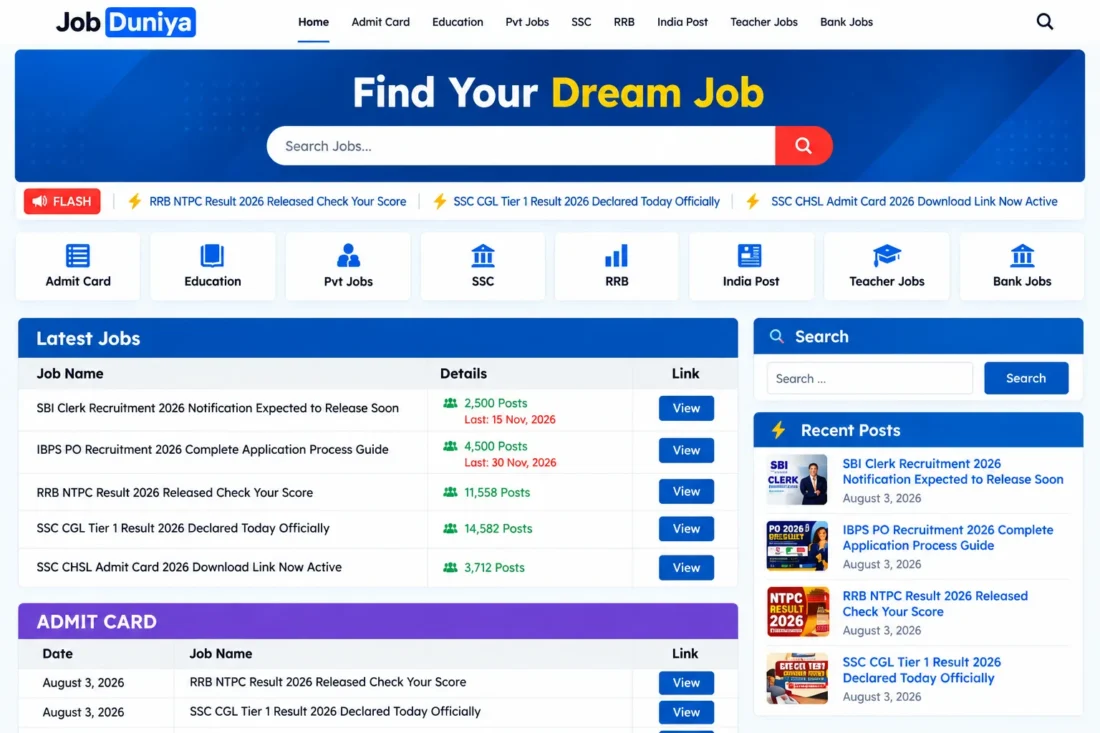
Job Duniya WordPress Theme – Government Jobs & Recruitment Website
- Modern WordPress theme for job portals
- Government job updates and recruitment listings
- Dynamic homepage with latest job notifications
- Custom job details and application deadlines
- WhatsApp group widget for instant alerts
- Responsive layouts for desktop and mobile
- Lifetime Access
- 6 Months Support
- Commercial License
- Instant Download
- Regular Updates
- Well Documentation
Description
Build a Professional Job Portal
Create a modern job information website with Job Duniya, a responsive WordPress theme designed for government job updates, Sarkari Naukri portals, recruitment announcements, and career blogs. Its clean layout helps visitors quickly find vacancy notifications, admit cards, exam updates, recruitment results, and employment news across desktop, tablet, and mobile devices.
Dynamic Job Listings and Details
Job Duniya uses standard WordPress posts and categories, so you can publish job updates without managing a separate custom post type. Each post can include a dedicated Job Details table with fields for vacancies, job post, last application date, and result date. Empty fields are automatically omitted to keep the information organized.
Flexible Homepage Sections
Present the latest opportunities through a homepage Latest Jobs table and customizable category sections. Choose which categories appear, adjust section titles, and control the number of jobs displayed. Category archive pages organize related announcements, while featured images and category quick-link icons help visitors browse your content more easily.
Customization and Communication Tools
Personalize your website through the WordPress Customizer. Configure typography, site width, logo, social links, contact details, footer text, and copyright information. The theme also includes a sidebar widget area, a WhatsApp group invitation widget, author profile boxes, related posts, and navigation menu locations.
Responsive Design for Career Websites
Whether you publish bank vacancies, railway recruitment, police jobs, admit cards, examination results, or private-sector opportunities, Job Duniya provides a practical foundation for a career information portal. Install the theme, configure your menus and sidebar, create categories, and start publishing job updates using familiar WordPress tools.
Key Features
- Responsive design for government job portals
- Latest Jobs table on the homepage
- Custom Job Details table for vacancy information
- Category-based job sections with customizable headings
- WhatsApp group invitation widget for job alerts
- Customizable typography, logo, colors, and footer
- Author profiles, related posts, and social links
Installation Guide
- Download the Job Duniya theme ZIP file to your computer.
- Log in to your WordPress Dashboard and navigate to Appearance → Themes → Add New Theme → Upload Theme.
- Select the `jobduniya.zip` file, click Install Now, and then click Activate.
- Navigate to Settings → Permalinks, select a structure such as Post name, and click Save Changes.
- Go to Appearance → Menus, create your primary navigation menu, and assign it to the Primary Menu location. Add links such as Home, Bank Jobs, Admit Cards, Results, and Railway Jobs.
- Open Appearance → Customize → Site Identity and upload your website logo.
- Navigate to Appearance → Customize → Job Duniya Theme Options to configure your WhatsApp group link, contact details, social media URLs, footer description, and copyright text.
- Go to Appearance → Customize → Homepage Settings to configure the job category sections and choose the categories and number of posts to display.
- Open Appearance → Widgets and add the required widgets to the Primary Sidebar. You can add an advertisement using a Custom HTML widget, Recent Posts, and the Job Duniya WhatsApp Group widget.
- Navigate to Posts → Categories and create categories for Bank Jobs, Admit Cards, Results, Railway Jobs, Police Jobs, or other relevant topics.
- Go to Posts → Add New Post to publish a job notification. Enter the title and content, assign a category, and upload a featured image.
- Locate the Job Details box in the post editor and enter the vacancy count, job post, last application date, and result date where applicable.
- Publish the post and visit the homepage, category archive, and individual post page to verify the layout.
- Test the website on desktop and mobile devices, and confirm that navigation, sidebar widgets, WhatsApp links, and job information display correctly.
Related products
-
 View Details
₹2,599.00₹449.00 -
 View Details
₹2,599.00₹1,499.00 -
 View Details
₹2,599.00₹399.00 -
 View Details
₹2,599.00₹999.00

Reviews
There are no reviews yet.