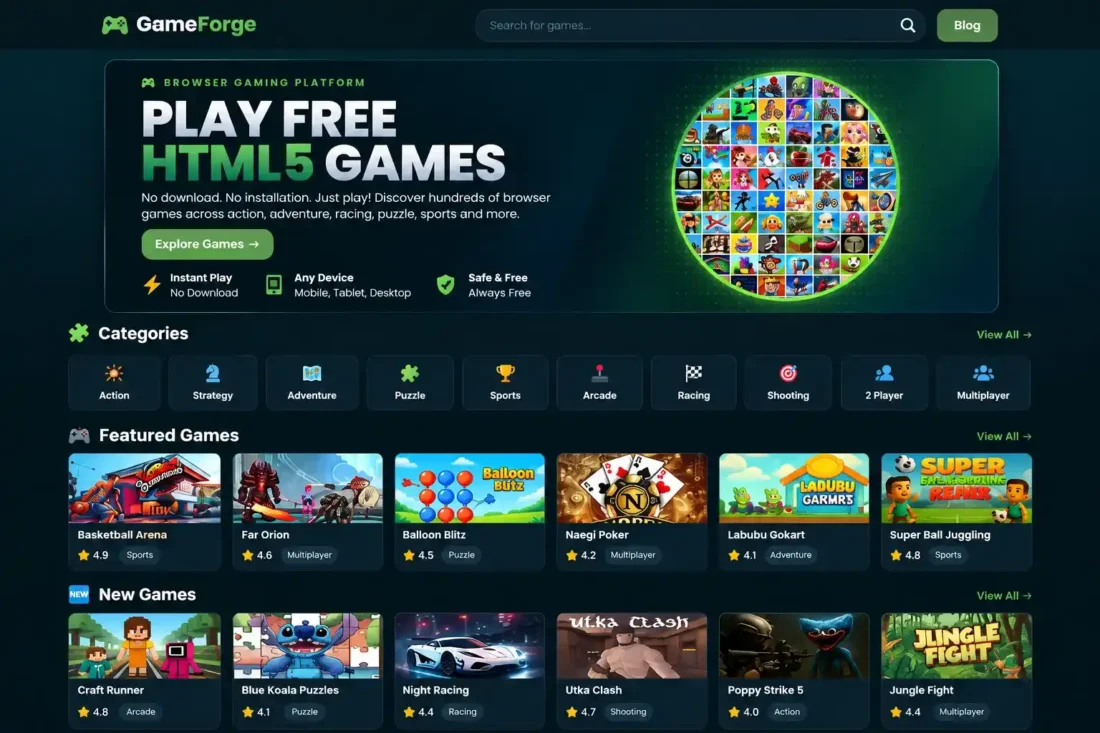
GameForge WordPress Gaming Theme
- Modern dark gaming website design
- Dedicated game library and categories
- Featured, popular, and new games
- Responsive layouts with search functionality
- Custom blog and archive page templates
- Demo backup with 437 game entries
- Lifetime Access
- 6 Months Support
- Commercial License
- Instant Download
- Regular Updates
- Well Documentation
Description
Create a Modern Gaming Website
Build an engaging gaming portal with GameForge, a modern, responsive WordPress theme designed for online game websites, gaming blogs, and browser game collections. Its sleek dark interface, structured layouts, and dedicated game management features help you create a professional gaming experience across desktop and mobile devices.
Dedicated Game Library
GameForge includes a custom Game post type, individual game pages, game archives, category archives, and game tags. Organize your collection and help visitors discover titles through a dedicated game library. The homepage features Featured Games, Popular Games, New Games, and game categories to showcase content in an organized layout.
Gaming Blog and Responsive Navigation
Publish gaming news, guides, reviews, and updates using standard WordPress posts and pages. The theme includes a dedicated blog layout, search results page, responsive navigation, and custom 404 page. You can assign your own WordPress menus to the header and footer and customize the website’s branding to suit your project.
Full Demo Game Backup Included
This bundle includes a separate GameForge backup ZIP containing game data and media files for importing demo content. The supplied backup contains 437 published game entries, with associated metadata and local media. The importer matches existing games by slug to update matching entries rather than creating duplicates during re-import.
Simple Setup and Content Management
Install and activate the theme, then use the GameForge Setup page under the Games menu to import your backup. Configure menus, refresh permalink settings, and review your game pages before launch. GameForge provides a practical foundation for gaming publishers who want a ready-to-populate WordPress website without manually creating every demo game entry.
Key Features
- Modern dark design for gaming websites and portals
- Dedicated game library with categories and tags
- Homepage sections for featured and popular games
- Responsive game archives with pagination and search
- Custom blog, single-post, and 404 page layouts
- Import and update games using slug matching
- Backup ZIP containing 437 games and media files
Installation Guide
- Download both the GameForge theme ZIP and the separate GameForge-Backup ZIP to your computer.
- Log in to your WordPress Dashboard and navigate to Appearance → Themes → Add New Theme → Upload Theme.
- Select the GameForge theme ZIP file, click Install Now, and then click Activate.
- Navigate to Settings → Permalinks and click Save Changes to refresh WordPress URLs. Avoid using the Plain permalink structure.
- Open Games → GameForge Setup or Games → Backup, depending on how the submenu appears in your dashboard.
- Click Choose File and select the separate `GameForge-Backup.zip` file.
- Click Upload & Import Backup and wait for the import process to finish.
- Review the import results to check how many games were created, updated, or encountered errors.
- Go to Appearance → Menus and assign your navigation menu to the Primary Menu location. Assign another menu to the Footer Menu location if required.
- Create a WordPress page for your blog and select the Blog Page template if you want a dedicated blog page.
- Visit your homepage, game archives, game categories, individual game pages, blog, and search results to verify that everything displays correctly.
- Test the website on desktop and mobile devices before making it publicly available.
- Keep a copy of the theme ZIP and backup ZIP in a safe location for future installation or recovery.
Related products
-
 View Details
৳ 3,603৳ 622 -
 View Details
৳ 3,603৳ 553 -
 View Details
৳ 3,603৳ 2,078 -
 View Details
৳ 3,603৳ 1,385

Reviews
There are no reviews yet.