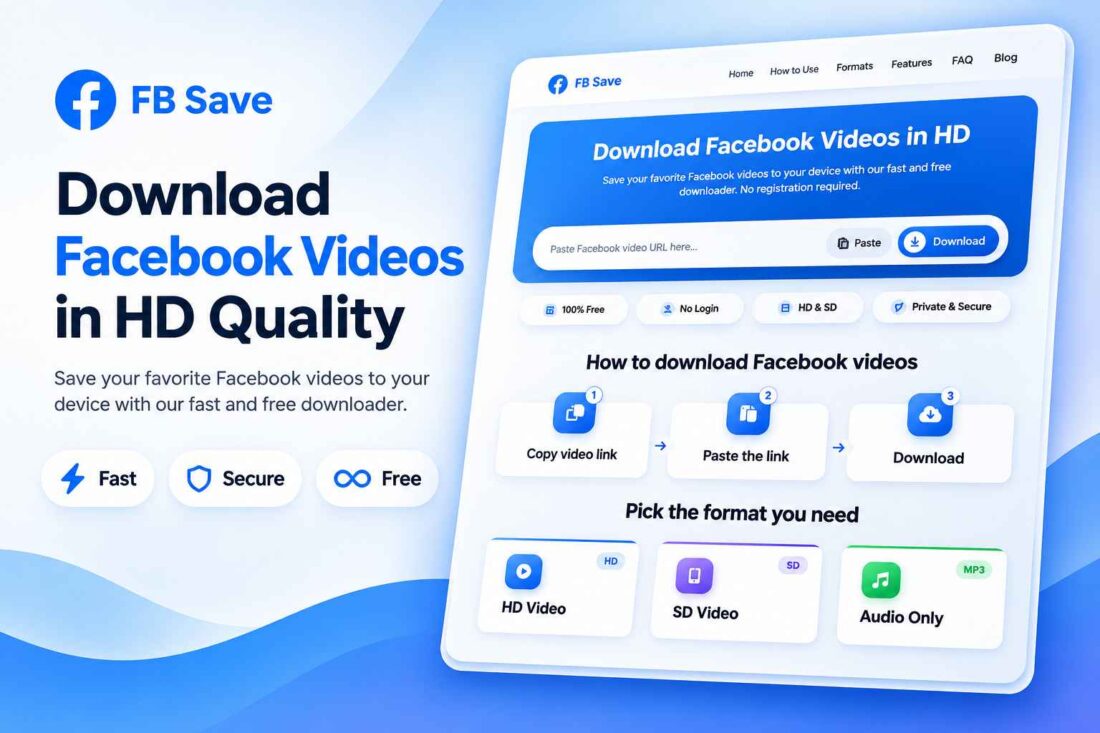
FB Save – Facebook Video Downloader PHP Script
- Launch your own Facebook video downloader
- Provide HD and SD download options
- Customize your website through the admin panel
- Manage blog posts, FAQs, and pages
- Configure ads, branding, menus, and colors
- No separate database required for configuration
- Lifetime Access
- 6 Months Support
- Commercial License
- Instant Download
- Regular Updates
- Well Documentation
Description
Build Your Own Facebook Video Downloader Website
FB Save is a standalone PHP script designed to help you launch a modern Facebook video downloader website. With a clean interface, responsive layout, and simple download workflow, it provides a practical solution for developers, entrepreneurs, and digital product creators who want to establish their own online video downloading service.
HD and SD Video Downloads
Visitors can paste a supported Facebook video link and retrieve available download options. The script detects video information, including the title and thumbnail when available, and provides HD and SD download links when they can be extracted. Its built-in download proxy helps deliver supported video files directly to visitors’ devices.
Modern, Responsive User Experience
FB Save includes a mobile-friendly interface designed for phones, tablets, and desktop computers. Its lightweight front end features a straightforward URL input, clear download actions, usage instructions, feature sections, and frequently asked questions. The organized layout helps visitors understand the process without installing additional software.
Powerful Admin Dashboard
Manage your website through the built-in administration panel. Customize your site name, SEO title, description, logo, favicon, primary color, homepage sections, navigation menus, footer, and custom pages. You can also manage blog posts, FAQs, media uploads, advertising placements, and website backups without editing every setting manually.
Simple PHP Setup
FB Save uses file-based storage for its configuration and content, so a separate database is not required. Install it on compatible PHP hosting with the cURL extension enabled, then configure your website through the admin panel. The script includes password hashing, login protection, and form security features.
Video extraction depends on Facebook’s page structure and video accessibility. Private, restricted, or removed videos may not work. Always respect copyright and download content only when you have permission.
Key Features
- HD and SD Facebook video download options
- Automatic video title and thumbnail detection
- Responsive design for desktop, tablet, and mobile
- Secure administration dashboard with password hashing
- Built-in blog, custom pages, and FAQ management
- Advertising placements and website customization
- File-based configuration with backup and restore
Installation Guide
- Download the FB Save ZIP file and extract all files on your computer.
- Upload the extracted files and folders to your hosting directory, such as `public_html`, using your hosting File Manager or FTP client.
- Ensure your server supports PHP 8.1 or a compatible version and has the cURL and JSON extensions enabled.
- Enable Apache `mod_rewrite` and allow `.htaccess` rules if you are using Apache hosting, so the clean page and blog URLs work correctly.
- Make sure the `data` and `uploads` directories are writable by PHP so the website can save settings and uploaded media.
- Open your website's `/admin/` path in a browser to access the administration dashboard.
- Log in using the administrator credentials supplied with your copy of the script. The initial password is randomly generated, and the account requires a password change on first login.
- Open the Site Settings section to configure your website name, SEO title, meta description, logo, favicon, and primary color.
- Customize the homepage, navigation menu, footer, blog, FAQ, custom pages, and advertising settings.
- Use the Backup section to create a backup of your website configuration and content.
- Visit the homepage and test the downloader using a publicly accessible Facebook video URL.
- Check the HD and SD download options. If you want to use server-side MP3 conversion, make sure FFmpeg is installed and PHP's `exec()` function is enabled. Browser-based conversion is also included as a fallback.
- Test the website on desktop and mobile devices before making it publicly available.
Related products
-
 View Details
৳ 415৳ 137 -
 View Details
৳ 484৳ 207 -
 View Details
৳ 415৳ 137 -
 View Details
৳ 415৳ 137
Reviews
There are no reviews yet.