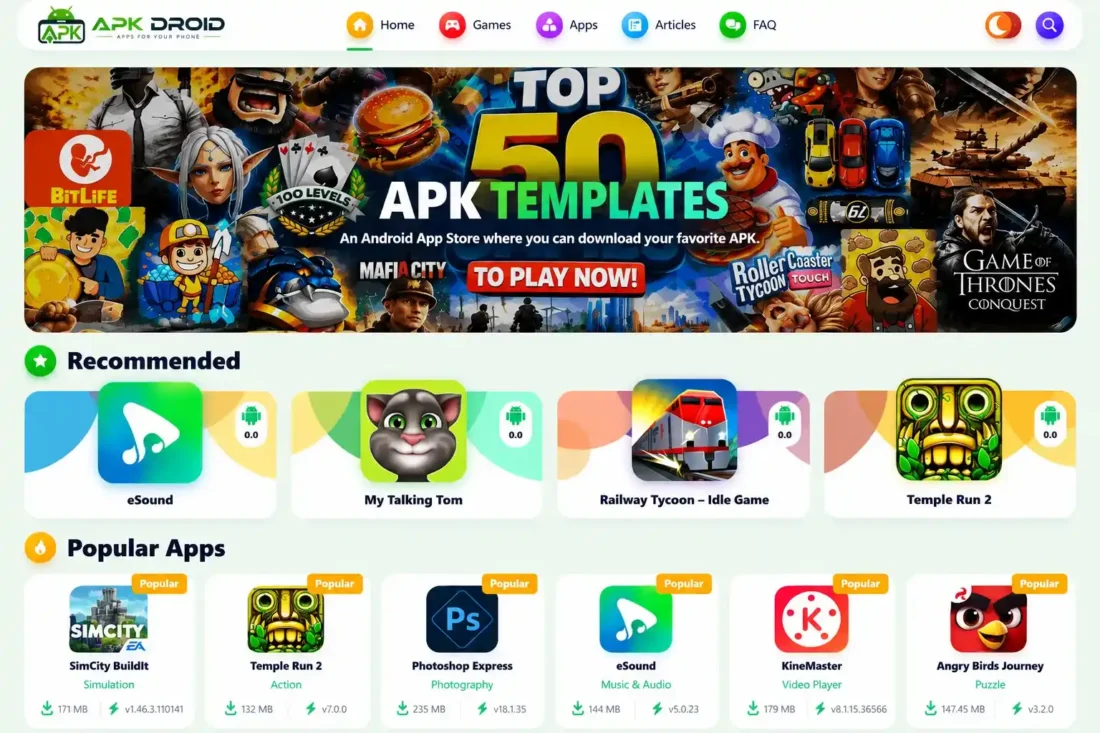
APK Droid – App & Game Download PHP Script
- Create your own app download website
- Build a complete game download platform
- Modern and responsive PHP script
- Mobile-friendly and easy to manage
- Recommended and popular app sections
- Fast, clean, and user-friendly design
- Perfect for APK and game websites
- Lifetime Access
- 6 Months Support
- Commercial License
- Instant Download
- Regular Updates
- Well Documentation
Description
ApkDroid– Modern Android APK Download Website Script
Launch your own Android app and APK download website with ApkDroid, a feature-rich PHP script designed for publishing Android applications, managing APK files, and building a professional app discovery platform. With a modern interface, dedicated application pages, category browsing, search functionality, and a comprehensive administration panel, ApkDroid provides a practical foundation for creating an APK download website.
📱 Modern App Download Platform
ApkDroid includes a homepage for showcasing applications, dedicated app detail pages, category listings, and search functionality. Visitors can explore available apps, view application information, and access dedicated download pages. The responsive public interface helps deliver a consistent browsing experience across desktop and mobile devices.
⚙️ Powerful Administration Dashboard
Manage your website through a dedicated admin panel featuring application management, category organization, blog publishing, editor’s choice selections, advertisement settings, SEO controls, and website customization. Additional sections cover header and footer management, statistics, FAQs, privacy information, and content export/import, giving administrators convenient control over essential website functions.
🔒 Secure Uploads and Flexible Configuration
The script supports APK uploads alongside application icons, logos, favicons, and blog images. Server-side validation checks uploaded file content, and APK uploads are restricted to APK files. Administrative forms include CSRF protection, while upload directories have rules to prevent uploaded scripts from executing.
🚀 Simple Installation and SEO Support
ApkDroid includes a guided installation wizard for configuring database credentials, website settings, and administrator access. It requires PHP 7.4 or later, MySQL or MariaDB, and the necessary PHP extensions. Apache with mod_rewrite is recommended for SEO-friendly URLs. Built-in sitemap functionality and configurable SEO settings help you manage your website’s search visibility.
ApkDroid is suitable for entrepreneurs, developers, and publishers who want to establish an Android application directory with organized content management and customizable website settings.
Note: This is a standalone PHP script, not a WordPress theme or a collection of APK files. Hosting and database configuration are required.
Key Features
- Modern, responsive Android app and APK download website
- Dedicated application detail pages, categories, and search functionality
- Admin dashboard for managing apps, blog posts, and editor’s choice selections
- APK upload validation and management for application assets
- Advertisement controls, SEO settings, and sitemap functionality
- Website customization with header, footer, FAQ, and privacy management
- Guided installation wizard with database and administrator account setup
Installation Guide
- Download the ApkDroid ZIP package and keep a backup copy.
- Prepare hosting that supports PHP 7.4 or later, MySQL or MariaDB, and the `pdo_mysql`, `fileinfo`, and `gd` PHP extensions.
- Ensure Apache `mod_rewrite` is enabled if you want to use SEO-friendly URLs.
- Extract the package and upload all website files to your domain’s document root using your hosting file manager or FTP.
- Open your domain in a browser to launch the automatic installation wizard.
- Enter your database connection details, configure the website settings, and create your administrator account by following the installer instructions.
- Complete the installation and remove the `/install/` directory for additional security.
- Visit `/admin/login.php` and sign in using the administrator credentials you created during installation.
- Configure your website settings, categories, navigation, SEO options, advertisements, and other available administration features.
- Add application details, upload valid APK files and app icons, and publish your initial content.
- Test the homepage, app pages, search, categories, download links, and mobile layout before launching your website.
Related products
-
 View Details
₹2,832.00₹299.00 -
 View Details
₹999.00₹499.00

Reviews
There are no reviews yet.