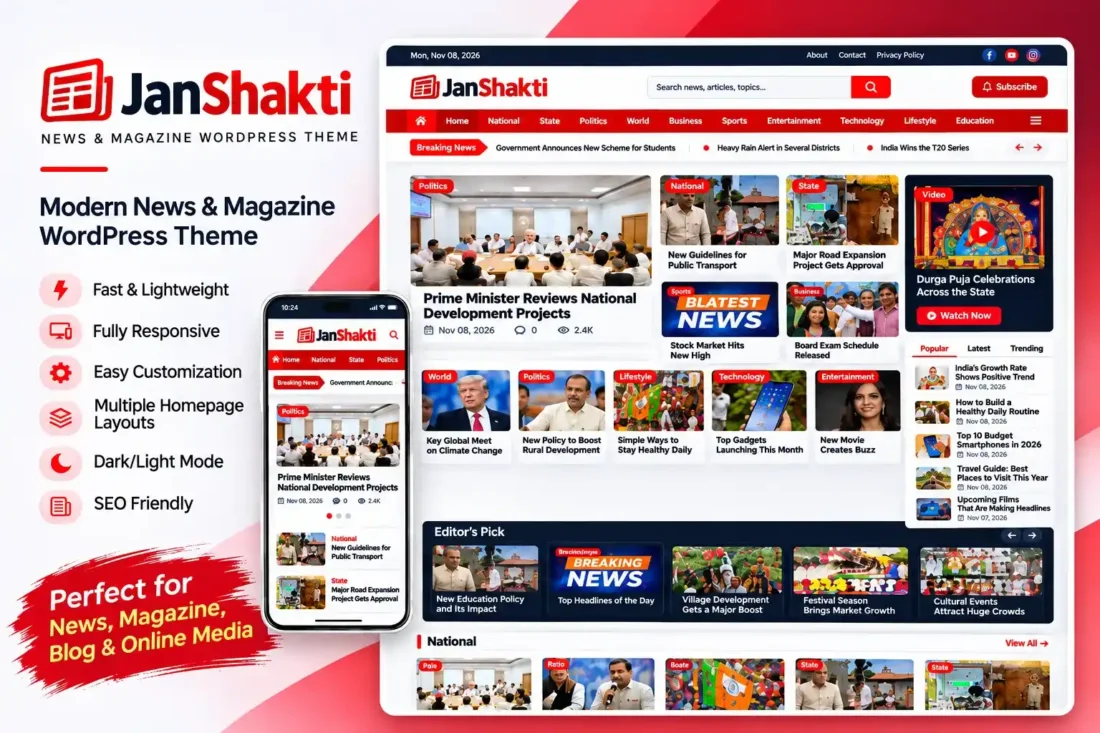
JanShakti – Multilingual News & Magazine WordPress Theme
- Build a modern digital news portal
- Support Hindi, English, and Bengali interfaces
- Display YouTube Live TV on homepage
- Add weather information without an API key
- Organize breaking, trending, and category news
- Customize branding through a dedicated dashboard
- Lifetime Access
- 6 Months Support
- Commercial License
- Instant Download
- Regular Updates
- Well Documentation
Description
Build a Professional News Website
JanShakti is a modern Classic WordPress theme designed for digital newspapers, online news portals, and magazine websites. Its editorial-style layout combines breaking news, featured stories, category sections, and live television in one organized homepage. It is suitable for publishers covering politics, technology, business, entertainment, sports, and current affairs.
Multilingual News Publishing
Reach readers in different languages with built-in Hindi, English, and Bengali interface translations. Choose your preferred website language from the JanShakti settings dashboard. Your article titles, categories, and published content remain under your control, allowing you to create a multilingual news experience.
Live TV, Weather and News Features
Display a YouTube live stream directly on your homepage and provide a dedicated Live TV page. The theme also includes a weather page powered by the free Open-Meteo API, requiring no API key. Other features include a breaking-news ticker, trending stories, popular news tabs, category sliders, a newsletter subscription section, and a reader news submission form.
Customization and Monetization
Manage your website through the dedicated JanShakti settings dashboard. Customize colors, page width, location label, featured-image watermark, homepage categories, Live TV details, footer information, and social media links. Additional features include WhatsApp integration, post location badges, manual excerpts, sticky featured-story badges, and customizable homepage sections.
Easy WordPress Installation
JanShakti supports custom logos, navigation menus, featured images, widgets, threaded comments, and responsive layouts. Its built-in templates make it easy to create dedicated Weather and Live TV pages. Designed for WordPress 5.8 or later and PHP 7.4 or later, JanShakti provides a practical foundation for launching a professional digital newsroom.
Key Features
- Hindi, English, and Bengali interface translations
- Live TV homepage section with YouTube video support
- Dedicated Live TV and Weather page templates
- Breaking-news ticker and trending news sections
- Customizable homepage with category sliders and sections
- Reader news submission form and newsletter subscription
- Admin dashboard for colors, branding, social links, and layout
Installation Guide
- Download the JanShakti theme ZIP file to your computer.
- Log in to your WordPress admin dashboard.
- Navigate to Appearance → Themes → Add New Theme → Upload Theme.
- Select the `janshakti.zip` file and click Install Now.
- After installation is complete, click Activate to enable the JanShakti theme.
- Navigate to Settings → Reading and select A Static Page under Your Homepage Displays. Choose any page as your homepage to activate the custom front-page layout.
- Optionally select a separate Posts page to display your latest blog articles.
- Go to Appearance → Menus and create your primary navigation menu. Assign it to the Primary Menu location.
- To create a Weather page, add a new WordPress page, choose the `मौसम (Weather)` template, and publish it.
- Open JanShakti → Theme Settings to select your website language: Hindi, English, or Bengali.
- Configure your location label, page width, color scheme, featured-image watermark, and social media links.
- Open the Homepage settings to add your YouTube Live TV video URL, customize Live TV details, select the category slider, and configure homepage category sections.
- Set up the Live TV and Submit Report navigation links using the available settings.
- Create your news categories and publish articles using the standard WordPress post editor.
- Use the News Location meta box to display a location badge on featured images. Add a Manual Excerpt to display the red quote box below the image, and mark important posts as Sticky to show the featured-story badge.
- Configure your footer description, contact email, copyright text, WhatsApp channel, and other social links.
- Preview your website on desktop and mobile devices to check the homepage, news articles, Live TV, weather page, and navigation.
Related products
-
 View Details
₹2,599.00₹999.00 -
 View Details
₹4,999.00₹1,499.00

Reviews
There are no reviews yet.